This time we’re going bigger than ever. Fabric, Power BI, SQL, AI and more. We're covering it all. You won't want to miss it.
Learn moreDid you hear? There's a new SQL AI Developer certification (DP-800). Start preparing now and be one of the first to get certified. Register now
Helllo
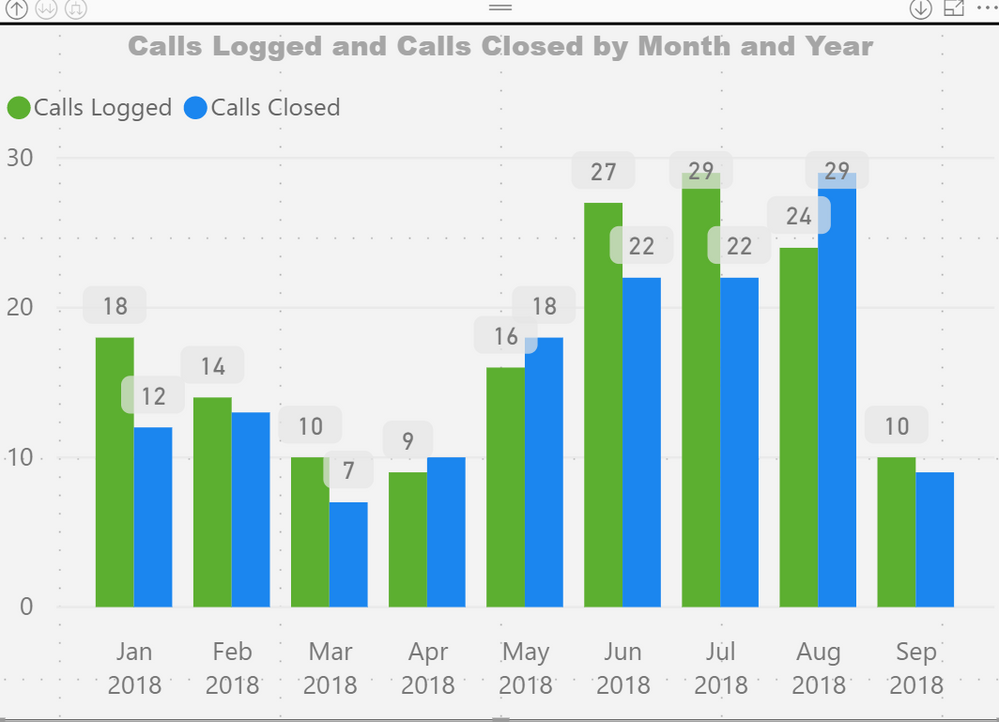
Is anyone else having issues with new preview workspaces? I am currently trialling a new preview workspace but having issues. If I publish a report to the new preview workspace several visualations are missing but if I publish the same report to an existing old version workspace then the visualations are present. I have admin access to both workspaces. My data source is an oodata feed and configured the same for both reports in both workspaces. I have attached screen print of the same visualation but in the different workspace to illustrate the difference.
Thanks in advance
.new workspace preview
original workspace
Hello
Unfortunately I cannot share the pbix as it contains personal identifiers. However, the PBIX file works fine and refreshes OK it's when I publish to the service the issue occurs. When the PBIX is initially published to the service all visuals are fine. It when a scheduled refresh occurs the problems happen.
I have configured my data source credentials for the odata data source
using the credentials that I use to connect to the data source from Power BI desktop - this should be sufficient shouldn't it? I'm configuring the credentials using basic authentification.
Hoping you can help and thanks in advance
Hi @Anonymous,
Your description here is some basic steps. I can't reproduce the issue with them. I would suggest you create a support ticket here.
Best Regards,
Dale
Check out the April 2026 Power BI update to learn about new features.
Sign up to receive a private message when registration opens and key events begin.
If you have recently started exploring Fabric, we'd love to hear how it's going. Your feedback can help with product improvements.
| User | Count |
|---|---|
| 10 | |
| 8 | |
| 7 | |
| 7 | |
| 7 |
| User | Count |
|---|---|
| 49 | |
| 27 | |
| 21 | |
| 20 | |
| 20 |