cancel
Showing results for 
Search instead for 
Did you mean: 

Try your skills in the Power BI Dataviz World Championship! Round one ends June 26. Join now

Reply
wilmer_Chisco
New Member

capacity limits reached

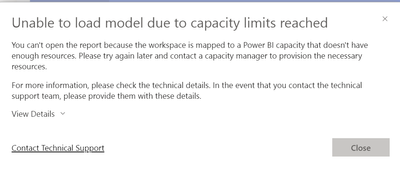
Cannot open any report via Power BI service. 


Was running no problem and now Cannot open any report from our workspaces, this is now urgent priority to fix. 


Underlying Error: Capacity operation failed with error code CapacityLimitExceeded
Service version: 13.0.22007.81
client Version: 2311.1.16680-train
Cluster URI: https://wabi-west-europe-redirect.analysis.windows.net/


wilmer_Chisco_0-1700920888198.png


1 ACCEPTED SOLUTION
Anonymous
Not applicable

Hi @wilmer_Chisco ,


We have reported this issue and submitted it to the product team.
They have been aware of the issue and the engineers will do their best to resolve it. I will update here if there is any progress, so please be patient. 


Best regards.
Community Support Team_ Caitlyn

View solution in original post

4 REPLIES 4
sergej_og
Super User
Super User

Do you use a Premium capacity or a shared one?
It sound like you don´t have enough RAM to process your data. Shared capacity with Pro license?

Anonymous
Not applicable

Hi @wilmer_Chisco ,


We have reported this issue and submitted it to the product team.
They have been aware of the issue and the engineers will do their best to resolve it. I will update here if there is any progress, so please be patient. 


Best regards.
Community Support Team_ Caitlyn

thanks,


now the service is normal again and we can open reports whitout trouble, But I'd like to know what the mistake was? And if it's still possible for it to happen again.

Fowmy
Super User
Super User

@wilmer_Chisco 

You will have to upgrade to a higher SKU due to high usage, refer these guides:

https://learn.microsoft.com/en-us/power-bi/enterprise/service-admin-premium-manage
https://learn.microsoft.com/en-us/power-bi/enterprise/service-premium-capacity-manage


Did I answer your question? Mark my post as a solution! and hit thumbs up


Subscribe and learn Power BI from these videos

Website LinkedIn PBI User Group

Helpful resources

Announcements
Fabric Data Days is here Carousel

Fabric Data Days 2026

Don't miss out on Data Days, June 15 through August 7. Learn Fabric, Power BI, SQL, AI and more.

May Power BI Update Carousel

Power BI Monthly Update - May 2026

Check out the May 2026 Power BI update to learn about new features.

Power BI DataViz World Championships carousel

Power BI DataViz World Championships - June 2026

A new Power BI DataViz World Championship is coming this June! Don't miss out on submitting your entry.