Join us in Barcelona for FabCon and SQLCon, September 28 - October 1, 2026.
This is best Fabric, Power BI, SQL and AI community event. How do we know? The last event sold out! Save €200 with code FABCMTY200.
Register now- Power BI forums
- Get Help with Power BI
- Desktop
- Service
- Report Server
- Power Query
- Mobile Apps
- Developer
- DAX Commands and Tips
- Custom Visuals Development Discussion
- Health and Life Sciences
- Power BI Spanish forums
- Translated Spanish Desktop
- Training and Consulting
- Instructor Led Training
- Dashboard in a Day for Women, by Women
- Galleries
- Data Stories Gallery
- Themes Gallery
- Contests Gallery
- QuickViz Gallery
- Quick Measures Gallery
- Visual Calculations Gallery
- Fabric Apps Gallery
- Notebook Gallery
- Translytical Task Flow Gallery
- TMDL Gallery
- R Script Showcase
- Webinars and Video Gallery
- Ideas
- Custom Visuals Ideas (read-only)
- Issues
- Issues
- Events
- Upcoming Events
The Fabric community is upgrading! Read all of the details including the timeline and what you can expect. Learn more
- Power BI forums
- Forums
- Get Help with Power BI
- Service
- Re: Waterfall issue
- Subscribe to RSS Feed
- Mark Topic as New
- Mark Topic as Read
- Float this Topic for Current User
- Bookmark
- Subscribe
- Printer Friendly Page


- Mark as New
- Bookmark
- Subscribe
- Mute
- Subscribe to RSS Feed
- Permalink
- Report Inappropriate Content
Waterfall issue
hi there,
I am not sure how to create waterfall by using the different measures. Would expert please help?
Attached the pbix, I would like the waterfall update when slicers selection of "customer" and "division" are changed. thanks
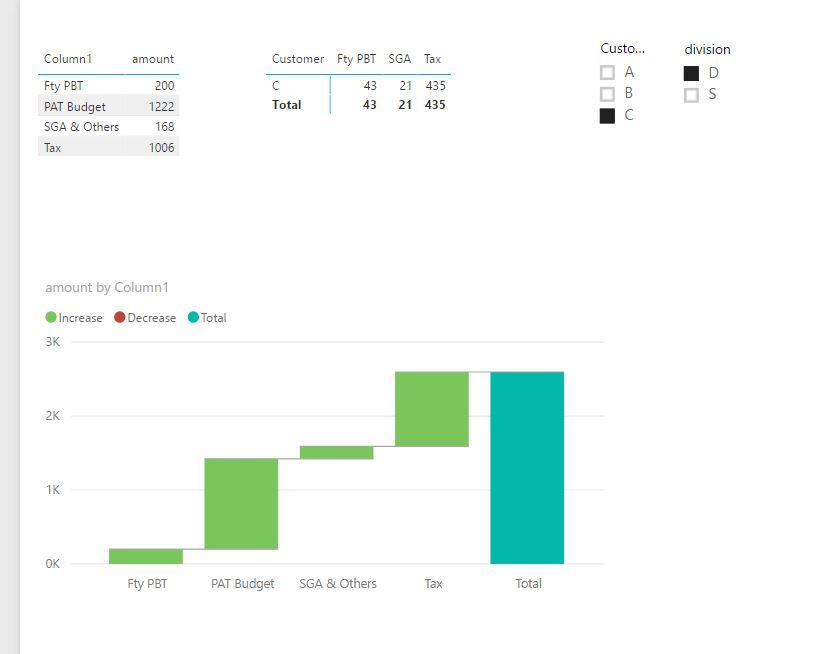
I have created the waterfall as below, however it can not be updated by slicer selection
Best regards
ER
Solved! Go to Solution.


- Mark as New
- Bookmark
- Subscribe
- Mute
- Subscribe to RSS Feed
- Permalink
- Report Inappropriate Content
Hi @erihsehc,
You could try two ways.
Solution 1
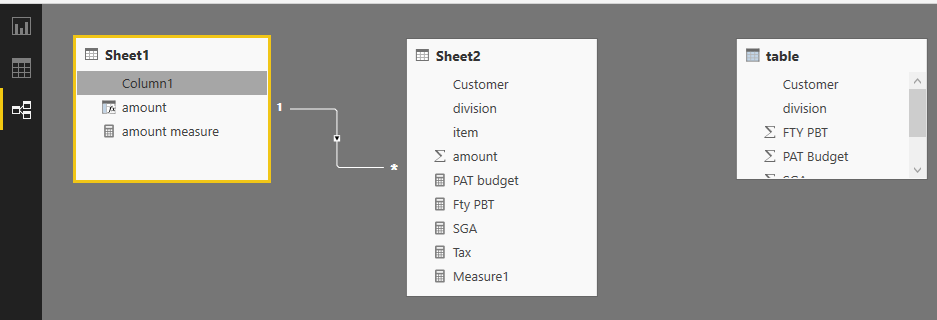
Create a one to many relationship between 'Sheet1' and 'Sheet2' based on common field.
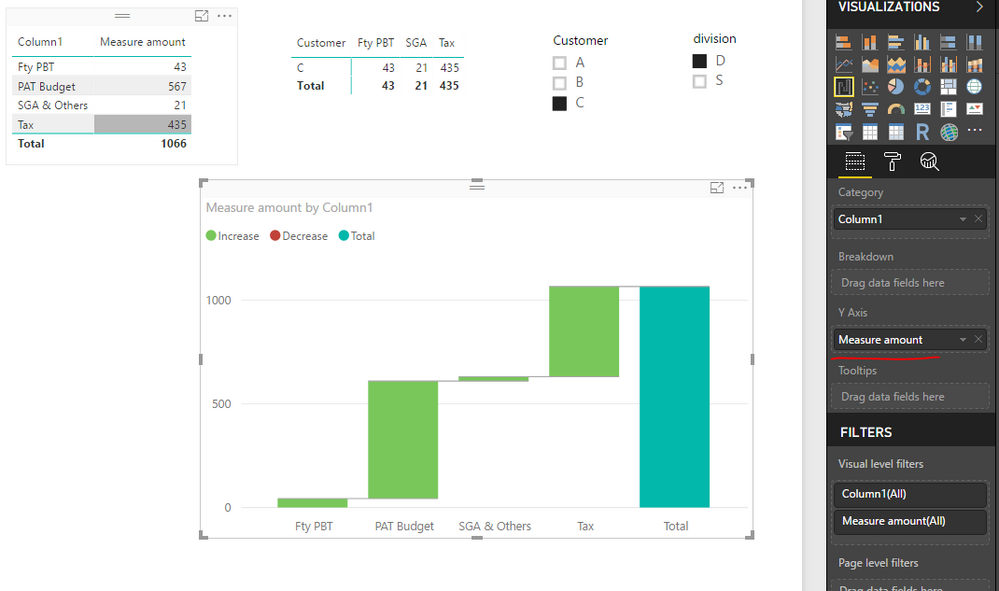
Create a simple measure like below. Add this measure into waterfall chart rather than a calculated column.
Measure amount = SUM(Sheet2[amount])
Solution2
Without any relationship between 'Sheet1' and 'Sheet2', create a measure like this, also, add this measure into waterfall chart.
Measure Amount2 =
IF (
    LASTNONBLANK ( Sheet1[Column1], 1 ) = "PAT Budget",
    [PAT budget],
    IF (
        LASTNONBLANK ( Sheet1[Column1], 1 ) = "Fty PBT",
        [Fty PBT],
        IF (
            LASTNONBLANK ( Sheet1[Column1], 1 ) = "SGA & Others",
            [SGA],
            IF ( LASTNONBLANK ( Sheet1[Column1], 1 ) = "Tax", [Tax] )
        )
    )
)
I have uploaded the modified .pbix file for your reference.
Best regards,
Yuliana Gu
If this post helps, then please consider Accept it as the solution to help the other members find it more quickly.
- Mark as New
- Bookmark
- Subscribe
- Mute
- Subscribe to RSS Feed
- Permalink
- Report Inappropriate Content
Hi @erihsehc,
How do you want the waterfall chart to be updated? If "customer" and "division" are related to columns you added to waterfall chart, the chart will update automatically based on slicer.
For more advice, please share sample data so that I can test for you.
Regards,
Yuliana Gu
If this post helps, then please consider Accept it as the solution to help the other members find it more quickly.
- Mark as New
- Bookmark
- Subscribe
- Mute
- Subscribe to RSS Feed
- Permalink
- Report Inappropriate Content
hi @v-yulgu-msft, yes it is, the waterfall should update based on the slicer selecion. here is the file pbix, thanks
- Mark as New
- Bookmark
- Subscribe
- Mute
- Subscribe to RSS Feed
- Permalink
- Report Inappropriate Content
Hi @erihsehc,
You could try two ways.
Solution 1
Create a one to many relationship between 'Sheet1' and 'Sheet2' based on common field.
Create a simple measure like below. Add this measure into waterfall chart rather than a calculated column.
Measure amount = SUM(Sheet2[amount])
Solution2
Without any relationship between 'Sheet1' and 'Sheet2', create a measure like this, also, add this measure into waterfall chart.
Measure Amount2 =
IF (
    LASTNONBLANK ( Sheet1[Column1], 1 ) = "PAT Budget",
    [PAT budget],
    IF (
        LASTNONBLANK ( Sheet1[Column1], 1 ) = "Fty PBT",
        [Fty PBT],
        IF (
            LASTNONBLANK ( Sheet1[Column1], 1 ) = "SGA & Others",
            [SGA],
            IF ( LASTNONBLANK ( Sheet1[Column1], 1 ) = "Tax", [Tax] )
        )
    )
)
I have uploaded the modified .pbix file for your reference.
Best regards,
Yuliana Gu
If this post helps, then please consider Accept it as the solution to help the other members find it more quickly.
- Mark as New
- Bookmark
- Subscribe
- Mute
- Subscribe to RSS Feed
- Permalink
- Report Inappropriate Content
thanks a lot @v-yulgu-msft, this perfectly works. BTW, why using lastnonblank function works? it is amazing. (I am a beginner on that):smileyhappy:
- Mark as New
- Bookmark
- Subscribe
- Mute
- Subscribe to RSS Feed
- Permalink
- Report Inappropriate Content
Hi @erihsehc,
In your scenario, you created a calculated column which is static. To show values conditionally based on slicer selection, we should choose measure. But, in a measure, we cannot directly reference to a column name, we can use lastnonblank function to get corresponding value in current context (current row). If Column1 is numeric, you can also use MAX, MIN, instead of LASTNONBLANK.
Best regards,
Yuliana Gu
If this post helps, then please consider Accept it as the solution to help the other members find it more quickly.
- Mark as New
- Bookmark
- Subscribe
- Mute
- Subscribe to RSS Feed
- Permalink
- Report Inappropriate Content
hi @v-yulgu-msft, yes it is, the waterfall should update based on the slicer selecion. pbix, thanks
- Mark as New
- Bookmark
- Subscribe
- Mute
- Subscribe to RSS Feed
- Permalink
- Report Inappropriate Content
would expert help on solving? thanks

Helpful resources

FabCon & SQLCon – Barcelona 2026
Join us in Barcelona for FabCon and SQLCon, the Fabric, Power BI, SQL, and AI community event. Save €200 with code FABCMTY200.

Power BI DataViz World Championships - June 2026
A new Power BI DataViz World Championship is coming this June! Don't miss out on submitting your entry.

| User | Count |
|---|---|
| 13 | |
| 11 | |
| 9 | |
| 6 | |
| 5 |


