Get Fabric or SQL Certified for Free.
Get certified for free when you join Fabric Data Days 2026 and dive into Fabric, Power BI, SQL, AI, and other essential data skills.
Join now- Power BI forums
- Get Help with Power BI
- Desktop
- Service
- Report Server
- Power Query
- Mobile Apps
- Developer
- DAX Commands and Tips
- Custom Visuals Development Discussion
- Health and Life Sciences
- Power BI Spanish forums
- Translated Spanish Desktop
- Training and Consulting
- Instructor Led Training
- Dashboard in a Day for Women, by Women
- Galleries
- Data Stories Gallery
- Themes Gallery
- Contests Gallery
- QuickViz Gallery
- Quick Measures Gallery
- Visual Calculations Gallery
- Fabric Apps Gallery
- Notebook Gallery
- Translytical Task Flow Gallery
- TMDL Gallery
- R Script Showcase
- Webinars and Video Gallery
- Ideas
- Custom Visuals Ideas (read-only)
- Issues
- Issues
- Events
- Upcoming Events
July 7 - July 17 | Round 2 of the Power BI Dataviz World Championships. Don't miss your chance! Learn more
- Power BI forums
- Forums
- Get Help with Power BI
- Service
- Re: Users cannot access reports
- Subscribe to RSS Feed
- Mark Topic as New
- Mark Topic as Read
- Float this Topic for Current User
- Bookmark
- Subscribe
- Printer Friendly Page


- Mark as New
- Bookmark
- Subscribe
- Mute
- Subscribe to RSS Feed
- Permalink
- Report Inappropriate Content
Users cannot access reports
Hello,
I am a pro power bi user and I have shared a report with another pro power bi user a few weeks back. However, for some reason, she is getting the following error whenever she tries to view the report.
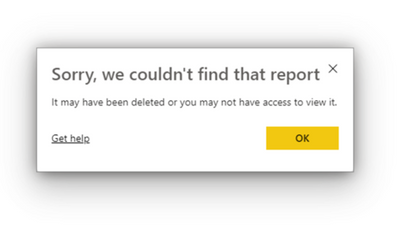
Could someone please explain to me why she would be getting this error even though she has access to it?
Solved! Go to Solution.


- Mark as New
- Bookmark
- Subscribe
- Mute
- Subscribe to RSS Feed
- Permalink
- Report Inappropriate Content
Hi, @syasmin25
Would you like to try the following steps and take a look if it can help you solve the problem:
- Download the report as pbix file and open it on the desktop.
- Create a new workspace in the service and assign roles to the end-user.
- Publish the report to the created workspace from desktop
- Then share the published report again to the end-user and check if he can open it(The end-user should guarantee that he is using the correct username to log in to the Power BI Service)
Thanks in advance!
Best Regards,
Community Support Team _Robert Qin
If this post helps, then please consider Accept it as the solution to help the other members find it more quickly.
- Mark as New
- Bookmark
- Subscribe
- Mute
- Subscribe to RSS Feed
- Permalink
- Report Inappropriate Content
Hi, @syasmin25
Would you like to try the following steps and take a look if it can help you solve the problem:
- Download the report as pbix file and open it on the desktop.
- Create a new workspace in the service and assign roles to the end-user.
- Publish the report to the created workspace from desktop
- Then share the published report again to the end-user and check if he can open it(The end-user should guarantee that he is using the correct username to log in to the Power BI Service)
Thanks in advance!
Best Regards,
Community Support Team _Robert Qin
If this post helps, then please consider Accept it as the solution to help the other members find it more quickly.
- Mark as New
- Bookmark
- Subscribe
- Mute
- Subscribe to RSS Feed
- Permalink
- Report Inappropriate Content
This seemd to help. Thank you
- Mark as New
- Bookmark
- Subscribe
- Mute
- Subscribe to RSS Feed
- Permalink
- Report Inappropriate Content
Hi, @syasmin25
If this reply helps you to solve your problem, would you like to mark this reply as a solution so that others can learn from it too?
Thanks in advance!
Best Regards,
Community Support Team _Robert Qin
If this post helps, then please consider Accept it as the solution to help the other members find it more quickly.
- Mark as New
- Bookmark
- Subscribe
- Mute
- Subscribe to RSS Feed
- Permalink
- Report Inappropriate Content
Hi, @syasmin25
According to your this problem, I think think the reason is linked to license or access, you should check these things:
- If the pro licenses of yours and your end-users are not yet expired, if it’s expired, they are not able to open the report.
- Did the end-user sign in with their own account when opening the URL of the report, it’s also important and I think the end-user should check.
- Have you moved or deleted the dataset and the report, you need to check again.
You can also take a look at these cases which are the same as your problem:
https://community.powerbi.com/t5/Service/Sorry-we-could-not-find-that-report/td-p/8888
https://community.powerbi.com/t5/Service/Sorry-we-couldn-t-find-that-report/td-p/941137
https://community.powerbi.com/t5/Service/Sorry-we-couldn-t-find-that-report/td-p/551894
Best Regards,
Community Support Team _Robert Qin
If this post helps, then please consider Accept it as the solution to help the other members find it more quickly.
- Mark as New
- Bookmark
- Subscribe
- Mute
- Subscribe to RSS Feed
- Permalink
- Report Inappropriate Content
Hello,
I did check on everything that you said and nothing seems to be working still. Also, I got to know that the workspace name does not show up next to the report for them. I am attaching a screenshot below.



- Mark as New
- Bookmark
- Subscribe
- Mute
- Subscribe to RSS Feed
- Permalink
- Report Inappropriate Content
Hi @syasmin25 ,
Has the new user ALWAYS gotten that response message or just recently? How did you share the report? Did you send them a link? Has the report name or report pages changed at all since you shared? Can you go look at the Access again and absolutley confirm that the user's name is there with a permission associated with it? let us know.
I would appreciate Kudos if my response was helpful. I would also appreciate it if you would Mark this As a Solution if it solved the problem. Thanks!
Did I answer your question? Mark my post as a solution!
Proud to be a Datanaut!
Private message me for consulting or training needs.
- Mark as New
- Bookmark
- Subscribe
- Mute
- Subscribe to RSS Feed
- Permalink
- Report Inappropriate Content
The user started getting that response recently (as in today), the user has had proper access for months. I have shared the report by sending them an email notification. I have made some changes to the dataset. But I have been doing it for a while, the report has been a work in progress and end-users were always able to access it by opening it from shared with me.
I have checked the access and the user does have permission. The user is an admin in the workspace as well.

Helpful resources

FabCon & SQLCon – Barcelona 2026
Join us in Barcelona for FabCon and SQLCon, the Fabric, Power BI, SQL, and AI community event. Save €200 with code FABCMTY200.

Fabric Community Sticker Challenge - Barcelona 2026
If you love stickers, then you will definitely want to check out our community sticker challenge, Barcelona edition!

Power BI Monthly Update - July 2026
Check out the July 2026 Power BI update to learn about new features.

Power BI DataViz World Championships - June 2026
A new Power BI DataViz World Championship is coming this June! Don't miss out on submitting your entry.

| User | Count |
|---|---|
| 17 | |
| 7 | |
| 6 | |
| 6 | |
| 5 |


