We've captured the moments from FabCon & SQLCon that everyone is talking about, and we are bringing them to the community, live and on-demand. Starts on April 14th. Register now
Hi Team,
I am facing issues to perform schedule refresh using web data source.
It says, I do not need a gateway to connect to data source.
I am also connected to my organization VPN inorder to get data.
It will be great, if anyone can help me please.
Thank you
@Anonymous you say you are using a web data source. Web sources do not require a gateway. And that is probably why it says you don't need a gateway.
Did you try refreshing the dataset without setting up the gateway?
If you are using a web data source and want to use gateway, you cannot use basic authentication type. Try anonymous and see if that works!
Did I answer your questions? Give a thumbs up and accept this post as solution!
Hi @_sfrost,
Thank you for your response, no I am not suing gateway.
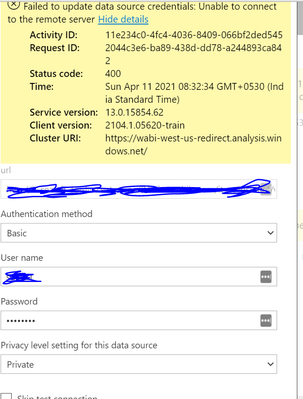
But, when I go to Data source credentials, I have entered my credentails and it says like above unable to connect.
@Anonymous did you try with anonymous authentication type?
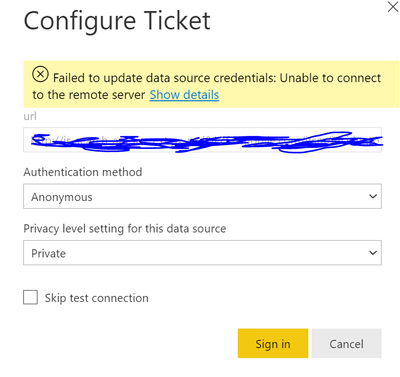
@_sfrost Yes, I did try with anonymous, but encountered the same
Please find this snippet for reference
Hi @Anonymous ,
Does the refresh work well in the Power BI desktop with the same credential? Do you have any other on-premise data source in the same dataset, then you need to use the gateway. Would you please show us m-query in advanced editor for troubleshooting? Have you use using the RelativePath and Query options with Web.Contents() ? Please refer to https://blog.crossjoin.co.uk/2016/08/23/web-contents-m-functions-and-dataset-refresh-errors-in-power-bi/
If this post helps, then please consider Accept it as the solution to help the other members find it more quickly.
Best Regards,
Dedmon Dai
@Anonymous your source requires authentication? And what is the source.
@_sfrost I am not sure of the authentication, but when I connected the web data source to power bi, it has asked for the username and I provided the username, which triggered the data.
After, I published the report and I wanted to perform schedule refresh and that is where it is showing as unable to connect.
I have tried with both anonymous and basic using my credentails.
Please let me know if I can do anything
If you have recently started exploring Fabric, we'd love to hear how it's going. Your feedback can help with product improvements.
A new Power BI DataViz World Championship is coming this June! Don't miss out on submitting your entry.
Share feedback directly with Fabric product managers, participate in targeted research studies and influence the Fabric roadmap.