We've captured the moments from FabCon & SQLCon that everyone is talking about, and we are bringing them to the community, live and on-demand. Starts on April 14th. Register now
Hi Team,
I am facing issues to perform schedule refresh using web data source.
It says, I do not need a gateway to connect to data source.
I am also connected to my organization VPN inorder to get data.
It will be great, if anyone can help me please.
Thank you
@Anonymous you say you are using a web data source. Web sources do not require a gateway. And that is probably why it says you don't need a gateway.
Did you try refreshing the dataset without setting up the gateway?
If you are using a web data source and want to use gateway, you cannot use basic authentication type. Try anonymous and see if that works!
Did I answer your questions? Give a thumbs up and accept this post as solution!
Hi @_sfrost,
Thank you for your response, no I am not suing gateway.
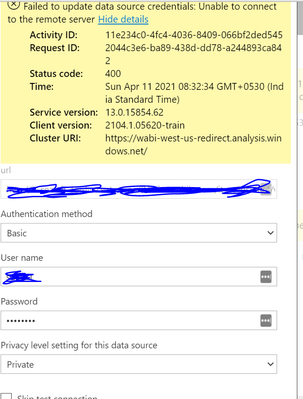
But, when I go to Data source credentials, I have entered my credentails and it says like above unable to connect.
@Anonymous did you try with anonymous authentication type?
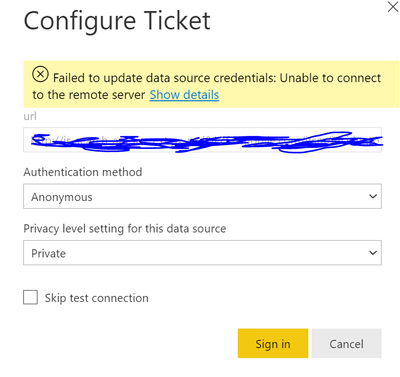
@_sfrost Yes, I did try with anonymous, but encountered the same
Please find this snippet for reference
Hi @Anonymous ,
Does the refresh work well in the Power BI desktop with the same credential? Do you have any other on-premise data source in the same dataset, then you need to use the gateway. Would you please show us m-query in advanced editor for troubleshooting? Have you use using the RelativePath and Query options with Web.Contents() ? Please refer to https://blog.crossjoin.co.uk/2016/08/23/web-contents-m-functions-and-dataset-refresh-errors-in-power-bi/
If this post helps, then please consider Accept it as the solution to help the other members find it more quickly.
Best Regards,
Dedmon Dai
@Anonymous your source requires authentication? And what is the source.
@_sfrost I am not sure of the authentication, but when I connected the web data source to power bi, it has asked for the username and I provided the username, which triggered the data.
After, I published the report and I wanted to perform schedule refresh and that is where it is showing as unable to connect.
I have tried with both anonymous and basic using my credentails.
Please let me know if I can do anything
If you have recently started exploring Fabric, we'd love to hear how it's going. Your feedback can help with product improvements.
A new Power BI DataViz World Championship is coming this June! Don't miss out on submitting your entry.