Join us at FabCon Atlanta from March 16 - 20, 2026, for the ultimate Fabric, Power BI, AI and SQL community-led event. Save $200 with code FABCOMM.
Register now!The Power BI Data Visualization World Championships is back! It's time to submit your entry. Live now!
Hi,
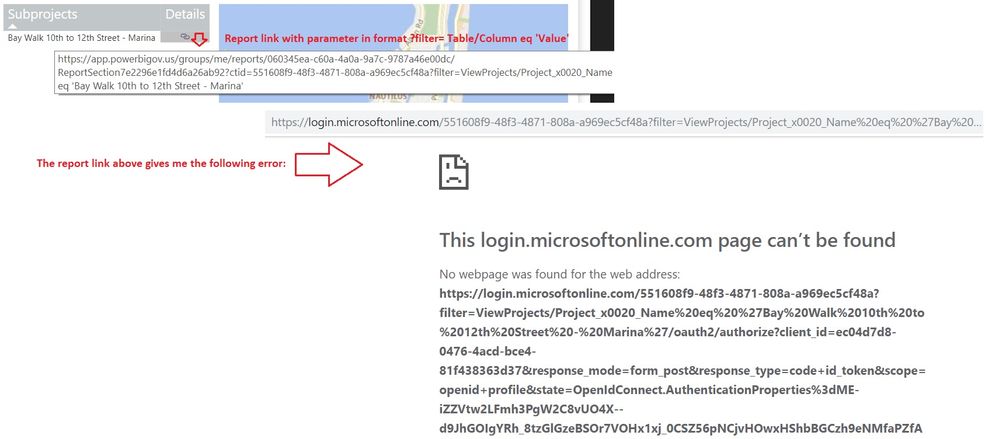
I am having an issue passing parameters in a report URL. I am following the documented format: URL?filter Table/ColumnName eq 'value' but I get error 404 (see image below). The report works without passing a parameter.
I am using the following parameters:
Table Name = ViewProjects
Column Name = Project Name
Value = 'Bay Walk 10th to 12th Street - Marina'
Please let me know what I am doing wrong.
Thank you!
Hi @Anonymous ,
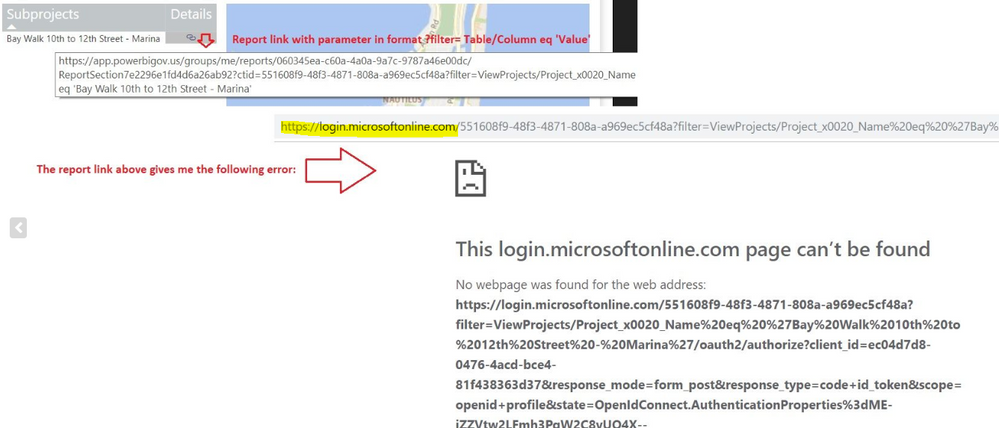
How did you get the report URL? The highlighted URL looks unmatched with the original one. Please refer to this document.
Best regards,
Yuliana Gu
Yuliana,
When I click on the report URL that I calculate, Power BI converts the link into "https://login.microsoftonline/55..."
Not sure why it does that.
When I do not select any values in my report (no Project Name selected), my formula returns the report URL without any filter, in which case the link works fine. Only when I select a value, the report filter does not work.
Thank you.
Carlos Tortoledo
Hi @Anonymous ,
Please set the data category for measure [Subproject Filter] to "Web URL". Besides, please copy the report URL appended with query string parameter into web address to check if it works, similar to below, replace 'xxxx' with a specific project name.
Hi Yuliana,
I tried the URL you provided with value I added (https://app.powerbigov.us/groups/me/reports/060345ea-c60a-4a0a-9a7c-9787a46e00dc/ReportSection7e2296... eq '72nd Street Park & Parking Structure'), but still not working. I get the same login error.
I also checked the measure [Subproject Filter], and it is indeed categorized as "Web URL".
At this point I am thinking it must be an internal network (on my end) access issue that I need to address with the support staff.
Thank you for all your help!
Regards,
Carlos Tortoledo
| User | Count |
|---|---|
| 22 | |
| 16 | |
| 9 | |
| 7 | |
| 4 |
| User | Count |
|---|---|
| 49 | |
| 43 | |
| 36 | |
| 16 | |
| 15 |