Join us at FabCon Atlanta from March 16 - 20, 2026, for the ultimate Fabric, Power BI, AI and SQL community-led event. Save $200 with code FABCOMM.
Register now!The Power BI Data Visualization World Championships is back! Get ahead of the game and start preparing now! Learn more
Hi,
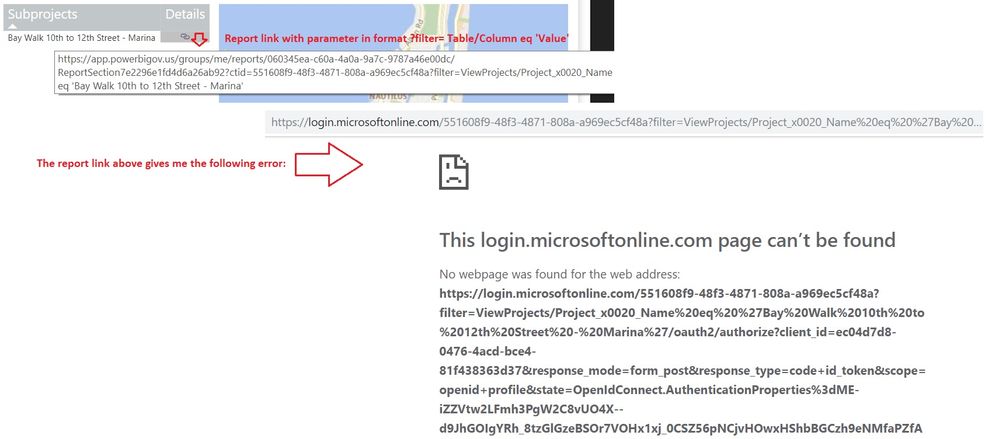
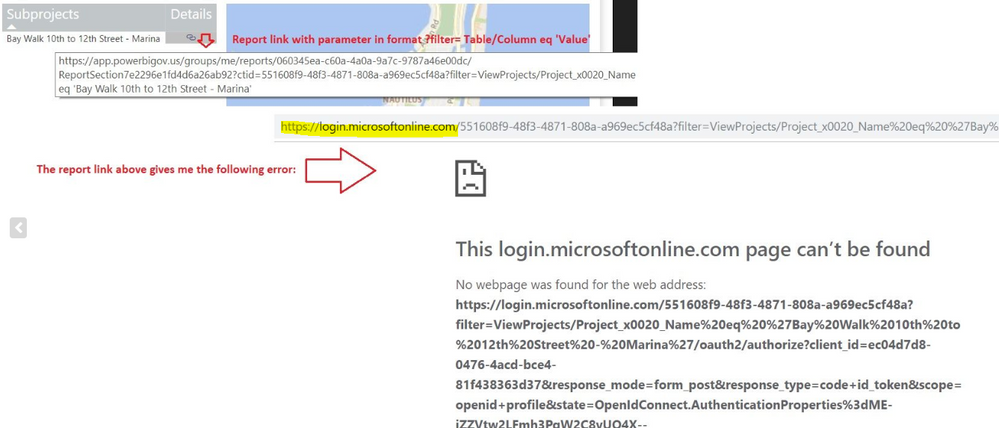
I am having an issue passing parameters in a report URL. I am following the documented format: URL?filter Table/ColumnName eq 'value' but I get error 404 (see image below). The report works without passing a parameter.
I am using the following parameters:
Table Name = ViewProjects
Column Name = Project Name
Value = 'Bay Walk 10th to 12th Street - Marina'
Please let me know what I am doing wrong.
Thank you!
Hi @Anonymous ,
How did you get the report URL? The highlighted URL looks unmatched with the original one. Please refer to this document.
Best regards,
Yuliana Gu
Yuliana,
When I click on the report URL that I calculate, Power BI converts the link into "https://login.microsoftonline/55..."
Not sure why it does that.
When I do not select any values in my report (no Project Name selected), my formula returns the report URL without any filter, in which case the link works fine. Only when I select a value, the report filter does not work.
Thank you.
Carlos Tortoledo
Hi @Anonymous ,
Please set the data category for measure [Subproject Filter] to "Web URL". Besides, please copy the report URL appended with query string parameter into web address to check if it works, similar to below, replace 'xxxx' with a specific project name.
Hi Yuliana,
I tried the URL you provided with value I added (https://app.powerbigov.us/groups/me/reports/060345ea-c60a-4a0a-9a7c-9787a46e00dc/ReportSection7e2296... eq '72nd Street Park & Parking Structure'), but still not working. I get the same login error.
I also checked the measure [Subproject Filter], and it is indeed categorized as "Web URL".
At this point I am thinking it must be an internal network (on my end) access issue that I need to address with the support staff.
Thank you for all your help!
Regards,
Carlos Tortoledo
The Power BI Data Visualization World Championships is back! Get ahead of the game and start preparing now!
| User | Count |
|---|---|
| 56 | |
| 55 | |
| 32 | |
| 18 | |
| 14 |