Share feedback directly with Fabric product managers, participate in targeted research studies and influence the Fabric roadmap.
Sign up nowGet Fabric certified for FREE! Don't miss your chance! Learn more
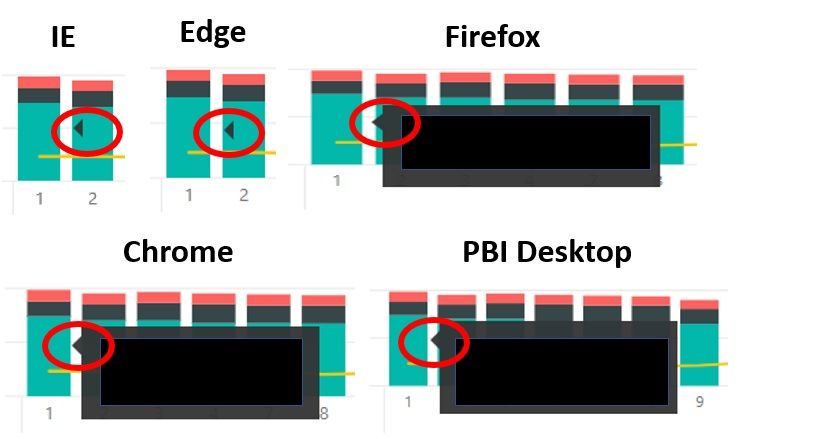
I have an issue with the standard tooltip in Internet Explorer and Edge. When I hover over a data element with the default Tooltip (in either IE or Edge), I get the little black triangle that points to the mouse, but no Tooltip. When I hover over a data element in Firefox, Chrome, or Power BI Desktop, I get the little triangle and the Tooltip.
This does not appear to impact custom Tooltips. I cleared cache, saved info, etc. in all browsers and made sure that all browsers are updated.
Any ideas?
Solved! Go to Solution.
Hi @mdhopkins ,
The Power BI Product team are officially targeting Nov 2nd for fix deployment, at the latest on the 15th.
Best Regards,
Icey
Hi @mdhopkins ,
Engineering team have fixed the Power BI Known issue : Tooltip not shown properly in IE11.
Please check.
Best Regards,
Icey
Hi @mdhopkins ,
Engineering team have fixed the Power BI Known issue : Tooltip not shown properly in IE11.
Please check.
Best Regards,
Icey
I can confirm that it is working in both Edge and IE now.
Hi @mdhopkins ,
The Power BI Product team are officially targeting Nov 2nd for fix deployment, at the latest on the 15th.
Best Regards,
Icey
Hi @mdhopkins ,
This issue had been submitted to power bi product team, and engineers are working on a fix. I will update it if there is a message.
Best Regards,
Icey
If this post helps, then please consider Accept it as the solution to help the other members find it more quickly.
If you love stickers, then you will definitely want to check out our Community Sticker Challenge!
Check out the January 2026 Power BI update to learn about new features.
| User | Count |
|---|---|
| 19 | |
| 10 | |
| 8 | |
| 7 | |
| 7 |
| User | Count |
|---|---|
| 51 | |
| 43 | |
| 30 | |
| 27 | |
| 25 |