This is best Fabric, Power BI, SQL and AI community event. How do we know? The last event sold out! Save €200 with code FABCMTY200.
Register nowThe Fabric community is upgrading! Read all of the details including the timeline and what you can expect. Learn more
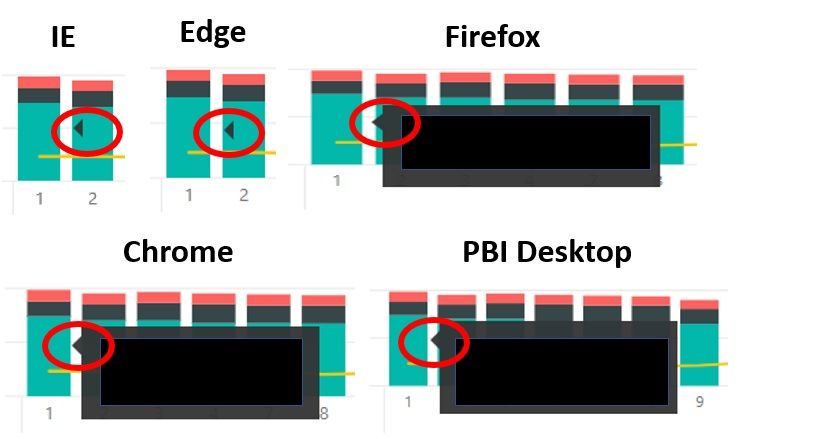
I have an issue with the standard tooltip in Internet Explorer and Edge. When I hover over a data element with the default Tooltip (in either IE or Edge), I get the little black triangle that points to the mouse, but no Tooltip. When I hover over a data element in Firefox, Chrome, or Power BI Desktop, I get the little triangle and the Tooltip.
This does not appear to impact custom Tooltips. I cleared cache, saved info, etc. in all browsers and made sure that all browsers are updated.
Any ideas?
Solved! Go to Solution.
Hi @mdhopkins ,
The Power BI Product team are officially targeting Nov 2nd for fix deployment, at the latest on the 15th.
Best Regards,
Icey
Hi @mdhopkins ,
Engineering team have fixed the Power BI Known issue : Tooltip not shown properly in IE11.
Please check.
Best Regards,
Icey
Hi @mdhopkins ,
Engineering team have fixed the Power BI Known issue : Tooltip not shown properly in IE11.
Please check.
Best Regards,
Icey
I can confirm that it is working in both Edge and IE now.
Hi @mdhopkins ,
The Power BI Product team are officially targeting Nov 2nd for fix deployment, at the latest on the 15th.
Best Regards,
Icey
Hi @mdhopkins ,
This issue had been submitted to power bi product team, and engineers are working on a fix. I will update it if there is a message.
Best Regards,
Icey
If this post helps, then please consider Accept it as the solution to help the other members find it more quickly.
Join us in Barcelona for FabCon and SQLCon, the Fabric, Power BI, SQL, and AI community event. Save €200 with code FABCMTY200.
| User | Count |
|---|---|
| 14 | |
| 11 | |
| 9 | |
| 7 | |
| 5 |