
cancel
Showing results for 
Search instead for 
Did you mean: 

Try your skills in the Power BI Dataviz World Championship! Round one ends June 26. Join now

Reply
Anonymous
Not applicable

Time out when Process database in SSAS

I have a model in SSAS, and it is import mode, Capability is 1500,


Recently I deploy a model into the SSAS,When I process every single table, I can refresh it successfully, 

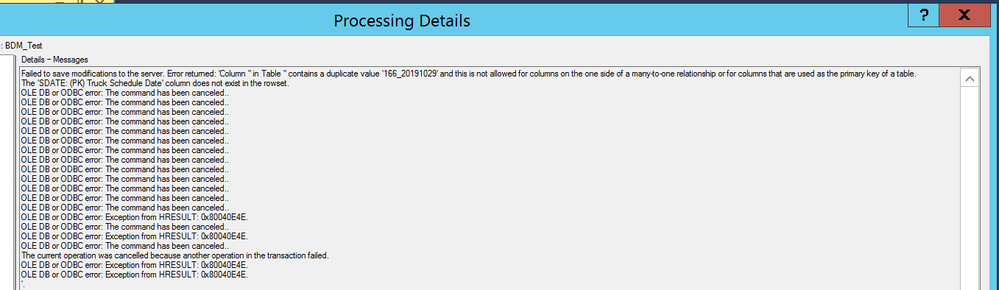
When I  processed the database full,  It prompt the below error all the times,

Could you please advise how to fix it? 

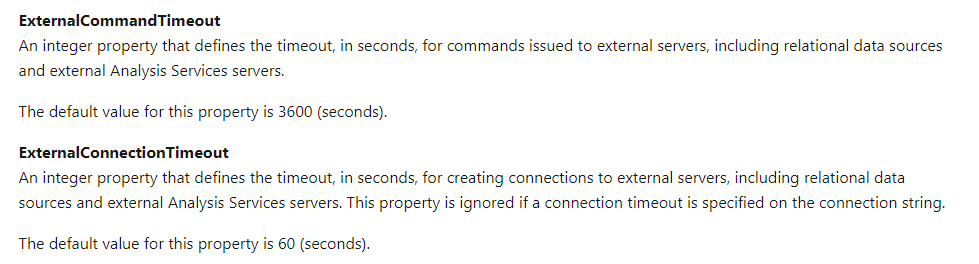
BTW, I have tried to set the SSAS server property ExternalCommandTimeout and ExternalConnectionTimeout to 0. it failed all the time.


Data refreshing issue.png

5 REPLIES 5
caglaceylan
New Member

Hello,


Did you managed to solve this problem?

Anonymous
Not applicable

Sorry, Attach a wrong screenshot, the error message is:BDF REFRESHING ISSUE.PNG

Failed to save modifications to the server. Error returned: 'OLE DB or ODBC error: [DataSource.Error] Microsoft SQL: Execution Timeout Expired.  The timeout period elapsed prior to completion of the operation or the server is not responding..

OLE DB or ODBC error: Exception from HRESULT: 0x80040E4E.

The current operation was cancelled because another operation in the transaction failed.

OLE DB or ODBC error: Exception from HRESULT: 0x80040E4E.

OLE DB or ODBC error: Exception from HRESULT: 0x80040E4E.

Hi @Anonymous ,


ddd3.PNG

Maybe you can set both parameters to 3600 seconds and try again.
Also, how big was the data you imported?


Best regards,
Lionel Chen

If this post helps, then please consider Accept it as the solution to help the other members find it more quickly.

Anonymous
Not applicable

@v-lionel-msft 

Hi Lionel,

Thanks for your solution, I set the Time to 3600, but it is not work, 

The Previous model is in the Power Bi desktop, it is 2.5 G, and recently we migrate it to SSAS server, and enlarge the time frame , May you please indicate me how to get the data volumn info in the SSAS?

Anonymous
Not applicable

Hi, could you resolve this one?


Helpful resources

Announcements
Fabric Data Days is here Carousel

Fabric Data Days 2026

Don't miss out on Data Days, June 15 through August 7. Learn Fabric, Power BI, SQL, AI and more.

May Power BI Update Carousel

Power BI Monthly Update - May 2026

Check out the May 2026 Power BI update to learn about new features.

Power BI DataViz World Championships carousel

Power BI DataViz World Championships - June 2026

A new Power BI DataViz World Championship is coming this June! Don't miss out on submitting your entry.