FabCon is coming to Atlanta
Join us at FabCon Atlanta from March 16 - 20, 2026, for the ultimate Fabric, Power BI, AI and SQL community-led event. Save $200 with code FABCOMM.
Register now!- Power BI forums
- Get Help with Power BI
- Desktop
- Service
- Report Server
- Power Query
- Mobile Apps
- Developer
- DAX Commands and Tips
- Custom Visuals Development Discussion
- Health and Life Sciences
- Power BI Spanish forums
- Translated Spanish Desktop
- Training and Consulting
- Instructor Led Training
- Dashboard in a Day for Women, by Women
- Galleries
- Data Stories Gallery
- Themes Gallery
- Contests Gallery
- QuickViz Gallery
- Quick Measures Gallery
- Visual Calculations Gallery
- Notebook Gallery
- Translytical Task Flow Gallery
- TMDL Gallery
- R Script Showcase
- Webinars and Video Gallery
- Ideas
- Custom Visuals Ideas (read-only)
- Issues
- Issues
- Events
- Upcoming Events
The Power BI Data Visualization World Championships is back! Get ahead of the game and start preparing now! Learn more
- Power BI forums
- Forums
- Get Help with Power BI
- Service
- Re: Some user can not view the report
- Subscribe to RSS Feed
- Mark Topic as New
- Mark Topic as Read
- Float this Topic for Current User
- Bookmark
- Subscribe
- Printer Friendly Page

- Mark as New
- Bookmark
- Subscribe
- Mute
- Subscribe to RSS Feed
- Permalink
- Report Inappropriate Content
Some user can not view the report
Hi,
I share a report with some colleges and some of them can not view the report (via web neither mobile)
I attach an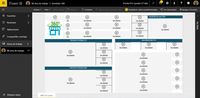
How can I solve it? My colleges are starting to use the tool and it is an inconvenient if it does not work properly
Thankx
Edu
Solved! Go to Solution.


- Mark as New
- Bookmark
- Subscribe
- Mute
- Subscribe to RSS Feed
- Permalink
- Report Inappropriate Content
If the App Workspace is NOT on Premium, then all users who access it via an App will require a Power BI Pro License.
- Mark as New
- Bookmark
- Subscribe
- Mute
- Subscribe to RSS Feed
- Permalink
- Report Inappropriate Content
You can go into Dataset, then on the dataset, click on the three dots "..." and if you have a Security Option click on that.
If you then see a name under Roles that could possibly be the issue?
- Mark as New
- Bookmark
- Subscribe
- Mute
- Subscribe to RSS Feed
- Permalink
- Report Inappropriate Content
Hello,
I have one role with nobody assigned to that. I suppose that means that no filter is applied to anybody.
Br,
Szabolcs
- Mark as New
- Bookmark
- Subscribe
- Mute
- Subscribe to RSS Feed
- Permalink
- Report Inappropriate Content
- Mark as New
- Bookmark
- Subscribe
- Mute
- Subscribe to RSS Feed
- Permalink
- Report Inappropriate Content
I have just published a new report with no roles in order to try to fix the error. I am checking it. I will you inform.
Many thankx
- Mark as New
- Bookmark
- Subscribe
- Mute
- Subscribe to RSS Feed
- Permalink
- Report Inappropriate Content
It has solved partially, some of the users can not still see the report.
- Mark as New
- Bookmark
- Subscribe
- Mute
- Subscribe to RSS Feed
- Permalink
- Report Inappropriate Content
I would suggest publishing your workspace to the app and share the content to those individuals in the App. I believe this should be the reccommended path to making Premium capacity available to free users in your environment. Otherwise, if you share the report with other users directly, they must have the PowerBI free license enabled in your environment.
- Mark as New
- Bookmark
- Subscribe
- Mute
- Subscribe to RSS Feed
- Permalink
- Report Inappropriate Content
If the App Workspace is NOT on Premium, then all users who access it via an App will require a Power BI Pro License.
- Mark as New
- Bookmark
- Subscribe
- Mute
- Subscribe to RSS Feed
- Permalink
- Report Inappropriate Content
At the end , it was a problem of roles that I have been using in order to simplify the report in each case. I will wait until this function will be optimized.
BTW, all users are Pro-licensed.
Thanks for the help
Edu

- Mark as New
- Bookmark
- Subscribe
- Mute
- Subscribe to RSS Feed
- Permalink
- Report Inappropriate Content
Hello,
I experience the same with an App in the Premium Capacity. The details show a 401 HTTP Response as the source of the error. Does it the same in your case? (As a workaround, you can add the people to the app workspace to solve this)
Br,
Szabolcs
- Mark as New
- Bookmark
- Subscribe
- Mute
- Subscribe to RSS Feed
- Permalink
- Report Inappropriate Content
Thankx for the response hodossy
This is the details of the error...
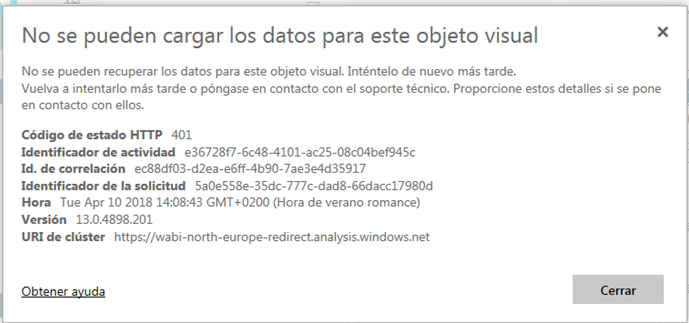
Is the same error as yours?
- Mark as New
- Bookmark
- Subscribe
- Mute
- Subscribe to RSS Feed
- Permalink
- Report Inappropriate Content
Yes, I believe. Unfortunatelly I don't have a solution yet 😞
- Mark as New
- Bookmark
- Subscribe
- Mute
- Subscribe to RSS Feed
- Permalink
- Report Inappropriate Content
Users say to me that it is happening only last week ago. So it could be a "external" problem of us . Is the same in your case?
Thankx
- Mark as New
- Bookmark
- Subscribe
- Mute
- Subscribe to RSS Feed
- Permalink
- Report Inappropriate Content
Hi @Eduardo_Jimenez, I would create a support ticket about this issue.
https://powerbi.microsoft.com/en-us/support/
You can access from the link above or have your admin create the ticket from the Office365 Admin portal.
Best of luck! Hope this was slightly helpful.
Helpful resources

Power BI Dataviz World Championships
The Power BI Data Visualization World Championships is back! Get ahead of the game and start preparing now!

Power BI Monthly Update - December 2025
Check out the December 2025 Power BI Holiday Recap!

FabCon Atlanta 2026
Join us at FabCon Atlanta, March 16-20, for the ultimate Fabric, Power BI, AI and SQL community-led event. Save $200 with code FABCOMM.


| User | Count |
|---|---|
| 56 | |
| 55 | |
| 31 | |
| 17 | |
| 14 |


