cancel
Showing results for 
Search instead for 
Did you mean: 

Get Fabric Certified for FREE during Fabric Data Days. Don't miss your chance! Request now

Reply
judspud
Solution Supplier
Solution Supplier

Sharing Combined Datasets With RLS

Hi All,


We have a situation where we have several workspaces containing datasets with RLS which are created by a dataset team.


Report developers connect to these datasets to combine and produce reports published into another workspace to be shared with the end users through an app.


RLS is applied from the original datasets to the developers and to the end users. We have tested the RLS with the report developers and it is working as expected when the datasets are combined.


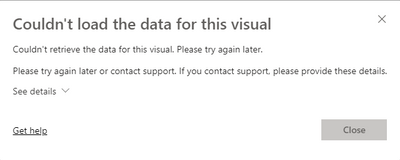
The end users however do not see any data in the visuals and get the following error message

judspud_0-1649174881347.png


The developers have viewer, build and reshare on the original datasets.

The end users have viewer on the datasets


Any help would be appreciated in how to resolve this issue.


Thanks,

George

1 ACCEPTED SOLUTION
GilbertQ
Super User
Super User

Hi @judspud 


Can you also make sure that under the dataset, then Manage Permissions that the same users have got Read & Build Permisisons if using Power BI Pro. If your datasets are in Premium or Premium Per User make sure that under the dataset, then Manage Permissions that the same users have got Read


Did I answer your question? Mark my post as a solution!

Proud to be a Super User!


Power BI Blog

View solution in original post

3 REPLIES 3
Anonymous
Not applicable

Hi  @judspud ,

You need to assign role to user to apply RLS filter, otherwise they will got this can't load data error.

Row-level security (RLS) with Power BI


BTW, current RLS only works on read permission, so admin and dataset owner can see each records even if they not get RLS roles.


This is the related document, you can view this content:

https://community.powerbi.com/t5/Service/Couldn-t-load-the-data-for-this-visual-Working-in-Desktop-b...

https://community.powerbi.com/t5/Service/Could-Not-Load-the-Data-from-this-Visual/m-p/431773


Best Regards,

Liu Yang

If this post helps, then please consider Accept it as the solution to help the other members find it more quickly.

Tutu_in_YYC
Super User
Super User

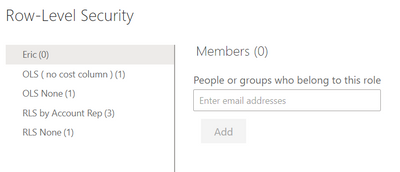
Users have to:

  1. be given permission to Report App
  2. be given permission in the Dataset in the dataset workspace
  3. assigned a role in the dataset Row Level Security


Are you missing any of these? I usually miss no 3. 

Tutu_in_YYC_0-1649220918916.png


GilbertQ
Super User
Super User

Hi @judspud 


Can you also make sure that under the dataset, then Manage Permissions that the same users have got Read & Build Permisisons if using Power BI Pro. If your datasets are in Premium or Premium Per User make sure that under the dataset, then Manage Permissions that the same users have got Read


Did I answer your question? Mark my post as a solution!

Proud to be a Super User!


Power BI Blog

Helpful resources

Announcements
November Power BI Update Carousel

Power BI Monthly Update - November 2025

Check out the November 2025 Power BI update to learn about new features.

Fabric Data Days Carousel

Fabric Data Days

Advance your Data & AI career with 50 days of live learning, contests, hands-on challenges, study groups & certifications and more!

FabCon Atlanta 2026 carousel

FabCon Atlanta 2026

Join us at FabCon Atlanta, March 16-20, for the ultimate Fabric, Power BI, AI and SQL community-led event. Save $200 with code FABCOMM.

Top Solution Authors
Top Kudoed Authors