This time we’re going bigger than ever. Fabric, Power BI, SQL, AI and more. We're covering it all. You won't want to miss it.
Learn moreLevel up your Power BI skills this month - build one visual each week and tell better stories with data! Get started
Hi together,
I didn't use shared datasets before so I have some basic issues.
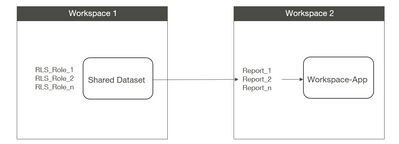
I have the following scenario at my workspace(s):
1st question: Do I have to set up all my required RLS-roles in the Shared Dataset?
2nd question: Do all the people of the RLS groups see all the reports in the App? (of course with their RLS filters)
Because if I use a dataset for each report then I can exclude the RLS groups from certain Reports and the users can't see anything in this reports. (what is my goal)
Thank you in advance!
Best regards,
Andreas
Solved! Go to Solution.
Hi,
Yes RLS is a property of datasets so that all needs to be configured in workspace 1.
End users also need direct permissions granting on the datasets (not at workspace level).
Also check that in your tennant settings use datasets across workspaces is enabled.
With regards to your second question. All reports would be visible in the app just some of them would show no data. Microsoft however just put "App Multiple Audiences" into public preview which should help you achieve what you need.
Hi @bcdobbs ,
thank you for your feedback.
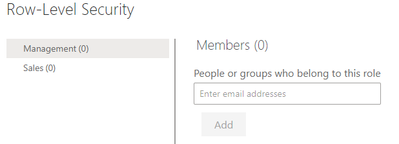
Regarding the end user permission for the dataset you mean this configuration?
Thank you for your hint regarding "App Multiple Audiences"! This will really help.
But until we can use it in our organization, all app users would see all the reports, right? (limited to the RLS filters or can I restrict some reports completely like I can do it now with the specific RLS filter for each dataset?)
Thank you and regards,
Andreas
Yes until you implemented that you're right they would see all reports.
The screen you've sent control RLS on the dataset. You also need to grant either read or build direct to the dataset itself (assuming app users don't have access directly to workspaces). I'll send a screen shot later if you need.
Hi,
Yes RLS is a property of datasets so that all needs to be configured in workspace 1.
End users also need direct permissions granting on the datasets (not at workspace level).
Also check that in your tennant settings use datasets across workspaces is enabled.
With regards to your second question. All reports would be visible in the app just some of them would show no data. Microsoft however just put "App Multiple Audiences" into public preview which should help you achieve what you need.
Check out the April 2026 Power BI update to learn about new features.
Sign up to receive a private message when registration opens and key events begin.
If you have recently started exploring Fabric, we'd love to hear how it's going. Your feedback can help with product improvements.
| User | Count |
|---|---|
| 11 | |
| 9 | |
| 8 | |
| 6 | |
| 6 |
| User | Count |
|---|---|
| 40 | |
| 27 | |
| 25 | |
| 22 | |
| 22 |