library(tidyverse)
data <- dataset
data$AvgangstidGruppe <- factor(rep(data$AvgangstidGruppe))
# Set a number of 'empty bar' to add at the end of each group
empty_bar <- 4
to_add <- data.frame( matrix(NA, empty_bar*nlevels(data$AvgangstidGruppe), ncol(data)) )
colnames(to_add) <- colnames(data)
to_add$AvgangstidGruppe <- rep(levels(data$AvgangstidGruppe), each=empty_bar)
data <- rbind(data, to_add)
data <- data %>% arrange(AvgangstidGruppe)
#Setting AvgangstidGruppeNR to correct Id
data$AvgangstidGruppeNr[data$AvgangstidGruppe == "Formiddag"] <- 4
data$AvgangstidGruppeNr[data$AvgangstidGruppe == "Rush, ettermiddag"] <- 5
data$AvgangstidGruppeNr[data$AvgangstidGruppe == "Rush, morgen"] <- 3
data$AvgangstidGruppeNr[data$AvgangstidGruppe == "Sen kveld"] <- 7
data$AvgangstidGruppeNr[data$AvgangstidGruppe == "Tidlig kveld"] <- 6
data$AvgangstidGruppeNr[data$AvgangstidGruppe == "Tidlig morgen"] <- 2
data$AvgangstidGruppeNr[data$AvgangstidGruppe == "Natt"] <- 1
data <- data[order(data$AvgangstidGruppeNr), ]
data$id <- seq(1, nrow(data))
# Get the name and the y position of each label
label_data <- data
number_of_bar <- nrow(label_data)
angle <- 90 - 360 * (label_data$id) /number_of_bar
label_data$hjust <- ifelse( angle < -90, 1, 0)
label_data$angle <- ifelse(angle < -90, angle+180, angle)
base_data <- data %>%
group_by(AvgangstidGruppe) %>%
summarize(start=min(id), end=max(id) - empty_bar) %>%
rowwise() %>%
mutate(title=mean(c(start, end)))
base_data <- base_data[order(base_data$start), ]
grid_data <- base_data
grid_data$end <- grid_data$end[ c( nrow(grid_data), 1:nrow(grid_data)-1)] + 1
grid_data$start <- grid_data$start -1
grid_data <- grid_data[-1,]
# Make the plot
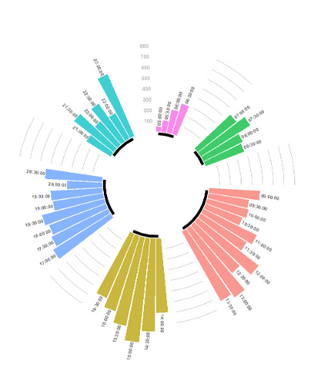
ggplot(data, aes(x=as.factor(id), y=Påstigende, fill=AvgangstidGruppe)) + # Note that id is a factor. If x is numeric, there is some space between the first bar
geom_bar(aes(x=as.factor(id), y=Påstigende, fill=AvgangstidGruppe), stat="identity", alpha=0.5) +
geom_segment(data=grid_data, aes(x = end, y = 800, xend = start, yend = 800), colour = "grey", alpha=1, size=0.3 , inherit.aes = FALSE ) +
geom_segment(data=grid_data, aes(x = end, y = 700, xend = start, yend = 700), colour = "grey", alpha=1, size=0.3 , inherit.aes = FALSE ) +
geom_segment(data=grid_data, aes(x = end, y = 600, xend = start, yend = 600), colour = "grey", alpha=1, size=0.3 , inherit.aes = FALSE ) +
geom_segment(data=grid_data, aes(x = end, y = 500, xend = start, yend = 500), colour = "grey", alpha=1, size=0.3 , inherit.aes = FALSE ) +
geom_segment(data=grid_data, aes(x = end, y = 400, xend = start, yend = 400), colour = "grey", alpha=1, size=0.3 , inherit.aes = FALSE ) +
geom_segment(data=grid_data, aes(x = end, y = 300, xend = start, yend = 300), colour = "grey", alpha=1, size=0.3 , inherit.aes = FALSE ) +
geom_segment(data=grid_data, aes(x = end, y = 200, xend = start, yend = 200), colour = "grey", alpha=1, size=0.3 , inherit.aes = FALSE ) +
geom_segment(data=grid_data, aes(x = end, y = 100, xend = start, yend = 100), colour = "grey", alpha=1, size=0.3 , inherit.aes = FALSE ) +
annotate("text", x = rep(max(data$id),8), y = c(100, 200, 300, 400, 500, 600, 700, 800), label = c("100", "200", "300", "400", "500", "600", "700", "800") , color="grey", size=3 , angle=0, fontface="bold", hjust=1) +
geom_bar(stat="identity", alpha=0.5) +
ylim(-500,1300) +
theme_minimal() +
theme(
legend.position = "none",
axis.text = element_blank(),
axis.title = element_blank(),
panel.grid = element_blank(),
plot.margin = unit(rep(-1,4), "cm")
) +
coord_polar() +
geom_text(data=label_data, aes(x=id, y=Påstigende+10, label=Halvtime, hjust=hjust), color="black", fontface="bold",alpha=0.6, size=2.5, angle= label_data$angle, inherit.aes = FALSE ) +
geom_segment(data=base_data, aes(x = start, y = -20, xend = end, yend = -20), colour = "black", alpha=1, size=2 )
geom_text(data=base_data, aes(x = title, y = -20, label=AvgangstidGruppe), hjust=c(0,0,0,0,0,0), vjust= c(0,0,0,0,0,0), colour = "black", alpha=1, size=0, fontface="bold", inherit.aes = FALSE)
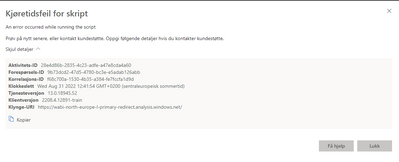
Any help in solving this would be much appreciated.
Thanks!