This time we’re going bigger than ever. Fabric, Power BI, SQL, AI and more. We're covering it all. You won't want to miss it.
Learn moreLevel up your Power BI skills this month - build one visual each week and tell better stories with data! Get started
Hi All,
I realize this is probably a very elementary question, but I cannot expand my nav pane and I'm not sure when or how it collapsed!
I don't see the 3 lines anywhere to expand the nav pane. Please help as I have reports to publish, and I'm stuck!
Thank you!
Deb
Solved! Go to Solution.
Hi @DebM11
I have submitted your issue to ICM , ID is 331892384 . If there is progress, I will come back and update .
Best regards,
Community Support Team Selina zhu
If this post helps, then please consider Accept it as the solution to help the other members find it more quickly.
Hello,
Yes I am using the app.powerbi.com URL to access PBI service. The 3 lines at the top of the collapsed nav pane are no longer there for me is what the issue is, so I cannot expand the nav pane. I have been working around it, but it's annoying to not know the reason, or how to fix it.
Thanks for your help!
Deb
Yes, you're correct. I figured out how to work around the issue so I could publish my reports, but the "Get Data" feature is still missing, nor am I able to expand the navigation pane.
Hi @DebM11
I have submitted your issue to ICM , ID is 331892384 . If there is progress, I will come back and update .
Best regards,
Community Support Team Selina zhu
If this post helps, then please consider Accept it as the solution to help the other members find it more quickly.
Hi @DebM11 ,
Are you using the URL app.powerbi.com? Have you encountered this problem before? Do you still have this problem now? Fortunately, all the useful content is still there, and regarding this icon you mentioned,
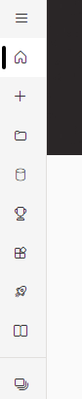
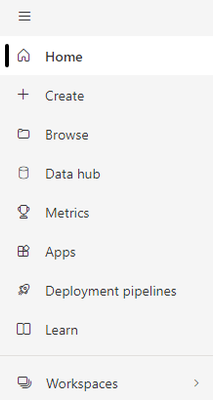
it is used to expand related content, as the following show:
before clicking:
after clicking:
Based on your situation, you can try to see if the function works properly, and I don't think it should affect your ability to successfully publish reports.
Best regards,
Community Support Team Selina zhu
If this post helps, then please consider Accept it as the solution to help the other members find it more quickly.
Check out the April 2026 Power BI update to learn about new features.
Sign up to receive a private message when registration opens and key events begin.
If you have recently started exploring Fabric, we'd love to hear how it's going. Your feedback can help with product improvements.
| User | Count |
|---|---|
| 11 | |
| 9 | |
| 9 | |
| 7 | |
| 6 |
| User | Count |
|---|---|
| 38 | |
| 27 | |
| 25 | |
| 22 | |
| 22 |