
This is best Fabric, Power BI, SQL and AI community event. How do we know? The last event sold out! Save €200 with code FABCMTY200.
Register nowThe Fabric community is upgrading! Read all of the details including the timeline and what you can expect. Learn more
I am relatively new to PowerBI. When I started I set up a dataset in Desktop and then published with a report to Service. I've since updated the dataset a number of times and republished it. In that time I've also developed a number of other reports for specific audiences solely in service. I've now discovered the theming options for reports but I believe this can only be applied in the Desktop.
I tried downloading reports, applying my theme and then republishing but this appears to create an additional dataset.
Is there any way that I can apply themes to the reports I've created in service?
hi, @Anonymous
I tried downloading reports, applying my theme and then republishing but this appears to create an additional dataset.
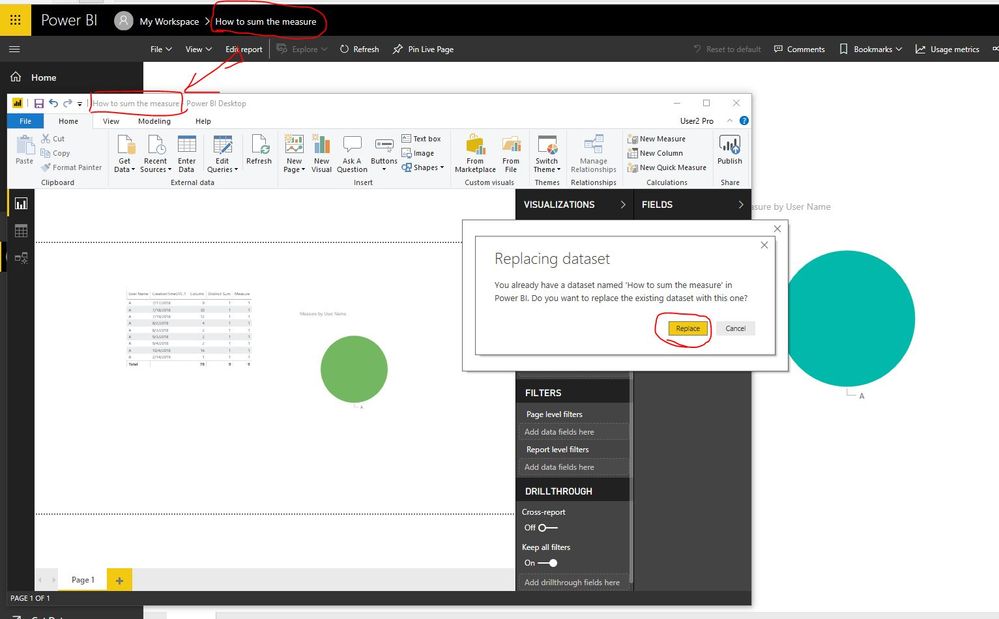
Just downloading reports, applying my theme and then republishing, Please note that if the report name in power bi service and power bi desktop are the same, and if is "Replace" the report.
Sometimes, when we download the report, the pbix file name maybe "name"+"(1)"
https://docs.microsoft.com/en-us/power-bi/desktop-report-themes
Best Regards,
Lin
Thanks for the reply but this is with regard to the additional reports I've created in the service not the initial one which yes does give me the option to replace. The other reports don't give me the option to replace with a report of the same name and both publishes a new report and a new dataset.
Join us in Barcelona for FabCon and SQLCon, the Fabric, Power BI, SQL, and AI community event. Save €200 with code FABCMTY200.
| User | Count |
|---|---|
| 15 | |
| 11 | |
| 9 | |
| 8 | |
| 6 |
| User | Count |
|---|---|
| 29 | |
| 23 | |
| 18 | |
| 15 | |
| 13 |