cancel
Showing results for 
Search instead for 
Did you mean: 

Try your skills in the Power BI Dataviz World Championship! Round one ends June 26. Join now

Reply
Anonymous
Not applicable

Problem to refresh SharePoint online List

I have a PowerBI report with about 20 SharePoints Online lists imported into to it. Roughly there are 5000 items (as of now) from these lists.


Of late, the refreshes have been taking a long time and are failing most of the times. I have configured "Connect directly" with OAuth2 in PowerBI services. My password hasn't changed - though the error suggests invalid credentials. I suspect that it's throwing that error because the connection cannot be kept open for more than 2 hours. (See the refresh start and end time). Please help on how to fix this.


SharePoint failure.png

3 REPLIES 3
v-jiascu-msft
Microsoft Employee
Microsoft Employee

Hi @Anonymous,


I think you are right. 5000 items couldn't be a big dataset. I think you need to optimize your data model. 

1. What are the relationships among these data tables?

2. How about refreshing it in the PBI Desktop?


Best Regards!

Dale

Community Support Team _ Dale
If this post helps, then please consider Accept it as the solution to help the other members find it more quickly.
Anonymous
Not applicable

Hi @v-jiascu-msft


15 of these tables are fact tables. They are merged in Power BI based on common columns. 5 are Dim Tables.


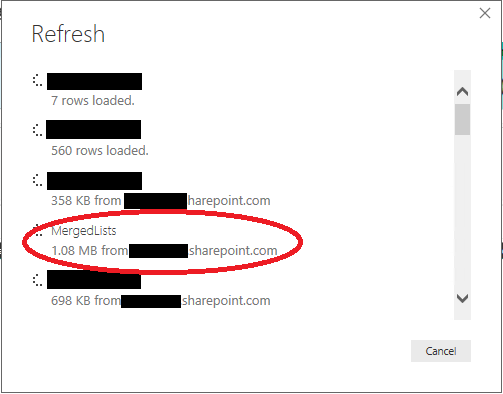
Even in Power BI desktop it takes same amount of time to refresh. One thing I've noticed is that, while refreshing the "merged table" gets around 100mb of data (cricled in the screenshot) from SharePoint now (this is when the problem started), while the actual size of the pbix file is around 10mb.


MergedLists.png


Hi @Anonymous,


I would suggest using proper relationship instead of merging them together. If you can merge them, you could create relationships too. The workload of refreshing could be downgrade. If you need more help, please provide a dummy .pbix file.


Best Regards!

Dale

Community Support Team _ Dale
If this post helps, then please consider Accept it as the solution to help the other members find it more quickly.

Helpful resources

Announcements
Fabric Data Days is here Carousel

Data Days 2026

Don't miss out on Data Days, June 15 through August 7. Learn Fabric, Power BI, SQL, AI and more.

May Power BI Update Carousel

Power BI Monthly Update - May 2026

Check out the May 2026 Power BI update to learn about new features.

Power BI DataViz World Championships carousel

Power BI DataViz World Championships - June 2026

A new Power BI DataViz World Championship is coming this June! Don't miss out on submitting your entry.