cancel
Showing results for 
Search instead for 
Did you mean: 

Data Days is here! Join us now for 60+ days of learning, challenges, and connection. Learn more

Reply
mhambalek
Helper I
Helper I

Hourly Refresh?

I've installed an on-premise gateway for connecting PBI to Netsuite using ODBC.  Works great.  However, I'm only able to schedule the dataset refresh weekly or daily.  The drop-down only has those two options.  I thought with a Pro account I could schedule an hourly refresh?

1 ACCEPTED SOLUTION
GilbertQ
Super User
Super User

Hi @mhambalek


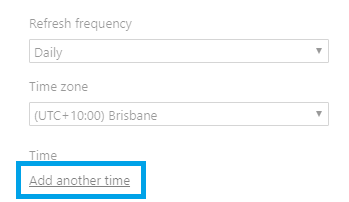
In the Dataset settings under Schedule Refresh, you have to click  on the Add another time as shown below.

 Email Pic (1).png


Did I answer your question? Mark my post as a solution!

Proud to be a Super User!


Power BI Blog

View solution in original post

4 REPLIES 4
GilbertQ
Super User
Super User

Hi @mhambalek


In the Dataset settings under Schedule Refresh, you have to click  on the Add another time as shown below.

 Email Pic (1).png


Did I answer your question? Mark my post as a solution!

Proud to be a Super User!


Power BI Blog

Anonymous
Not applicable

Also be aware that you can only set up to 8 times.  So if your working day is only going to care about 8 refreshes spaced hourly, you are good to go.


More refreshes become available with Premium.

Thanks @GilbertQ and @Anonymous,


I have a Pro license and the dataset is scheduled under my account.  The other users of the dashboard/reports don't have to be Pro, right?  Or do they have to be Pro to do a manual refresh?


Also, when I click the Refresh button at the top of a report it doesn't confirm that the refresh has started.  Is that normal?  I see it in the refresh history as in process though.  I would expect a confirmation or something after clicking that button.

Hi there.

Yes all users who want to view the report or dashboard will require a Pro license.

Also when you click Refresh at the top of the report that only refreshes the cache for the report.

If you want to refresh the dataset you have to go into the dataset and click on Refresh Now. As well as having your dataset connected to a gateway


Did I answer your question? Mark my post as a solution!

Proud to be a Super User!


Power BI Blog

Helpful resources

Announcements
Fabric Data Days is here Carousel

Fabric Data Days 2026

Don't miss out on Data Days, June 15 through August 7. Learn Fabric, Power BI, SQL, AI and more.

May Power BI Update Carousel

Power BI Monthly Update - May 2026

Check out the May 2026 Power BI update to learn about new features.

Power BI DataViz World Championships carousel

Power BI DataViz World Championships - June 2026

A new Power BI DataViz World Championship is coming this June! Don't miss out on submitting your entry.