Join us at FabCon Atlanta from March 16 - 20, 2026, for the ultimate Fabric, Power BI, AI and SQL community-led event. Save $200 with code FABCOMM.
Register now!The Power BI Data Visualization World Championships is back! Get ahead of the game and start preparing now! Learn more
Hello!
I've been used the heat map tool from Power BI and the zoom function do not keep when we change some filter on the region that we are analysing, so that we have to aply the zoom again. Can somebody help me with this? Or the community could get this as a suggestion, please...best regards, thank you!
Solved! Go to Solution.
Hi @amanda_gdf
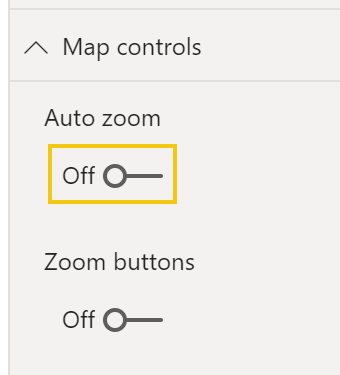
If you are using the "heat map" facility on the standard Power BI map, by default the map auto-zooms to show all datapoints each time you change filter context. It's quite easy to change this and "fix" the zoom level. On the map visualisation in the controls, go to "Map Controls" and turn AutoZoom off.
This will stop the map automatically moving or "zooming" each time you change filter context.
Hope this helps
Stuart
Hi @amanda_gdf
If you are using the "heat map" facility on the standard Power BI map, by default the map auto-zooms to show all datapoints each time you change filter context. It's quite easy to change this and "fix" the zoom level. On the map visualisation in the controls, go to "Map Controls" and turn AutoZoom off.
This will stop the map automatically moving or "zooming" each time you change filter context.
Hope this helps
Stuart
it worked, Stuart, thanks!!
The Power BI Data Visualization World Championships is back! Get ahead of the game and start preparing now!
| User | Count |
|---|---|
| 57 | |
| 56 | |
| 36 | |
| 18 | |
| 14 |