
Don't miss your chance to take the Fabric Data Engineer (DP-600) exam for FREE! Find out how by attending the DP-600 session on April 23rd (pacific time), live or on-demand.
Learn moreNext up in the FabCon + SQLCon recap series: The roadmap for Microsoft SQL and Maximizing Developer experiences in Fabric. All sessions are available on-demand after the live show. Register now
Hi everyone, I'm having this issue about gateway management:
On one hand I have an admin account in the server of my database which has a gateway installed. On this account I could register the gateway and a database origin without problems, showing them that are online and everything is fine.
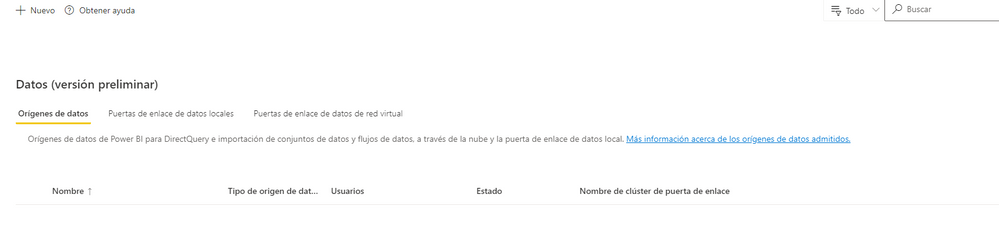
Then I shared the database origin with another user appearing them both shared on the admin account (shared photo in blue the second user), but suprisingly, in the manage gateway of the other user it does not appear (second photo).
Simply it does not appear (second photo) and that makes it harder to find a solution, anyone has ever had the same issue, and how did it solved?
One thing I'm doing right now is updating the gateway but that does not make sanse to be the trouble.
Than you all!
Solved! Go to Solution.
Sorry to take my time to answer, it happened the following:
Revised the gateway of the client and he installed correctly but assigned the control to an admin account of another tenant of his enterprises (both account emails looked almost the same).
So what seemed was, that sharing the gateway between accounts of different tenants did not work well. I reinstalled from 0 the gateway with the correct admin account of the desired tenant and it just worked.
Thank @collinq for your time, I took care of what you said, this one was one of those mistakes that are so hard to find out, as it does not pop out an error message.
Hi @Osky ,
Can you confirm that you have installed the standard and not the personal gateway on that server?
And. to clarify, are you trying to share the entire gateway or just the data source with the second person? The gateway will appear in the second column and that is where we would expect the user to appear. Like this:
Proud to be a Datanaut!
Private message me for consulting or training needs.
Sorry to take my time to answer, it happened the following:
Revised the gateway of the client and he installed correctly but assigned the control to an admin account of another tenant of his enterprises (both account emails looked almost the same).
So what seemed was, that sharing the gateway between accounts of different tenants did not work well. I reinstalled from 0 the gateway with the correct admin account of the desired tenant and it just worked.
Thank @collinq for your time, I took care of what you said, this one was one of those mistakes that are so hard to find out, as it does not pop out an error message.
If you have recently started exploring Fabric, we'd love to hear how it's going. Your feedback can help with product improvements.
A new Power BI DataViz World Championship is coming this June! Don't miss out on submitting your entry.
| User | Count |
|---|---|
| 11 | |
| 11 | |
| 9 | |
| 8 | |
| 8 |
| User | Count |
|---|---|
| 30 | |
| 28 | |
| 20 | |
| 16 | |
| 15 |