
Get certified for free when you join Fabric Data Days 2026 and dive into Fabric, Power BI, SQL, AI, and other essential data skills.
Join nowJuly 7 - July 17 | Round 2 of the Power BI Dataviz World Championships. Don't miss your chance! Learn more
Hi all,
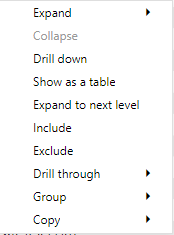
I have a matrix visual with 3 levels and when rightclicking in Desktop i get the option to Exclude/Include, but not when doing the same in Service. Anyone experienced this or have an explanation?
Desktop
Service
Thank you for being awsome!
Br,
Adrian
Hi @Anonymous ,
I have tested several reports but didn't find this issue. You could shift to New Look, some lost options may appear.
Here is a similar case for your reference:https://community.powerbi.com/t5/Service/Drillthrough-not-working-in-Service-Very-basic-example-atta...
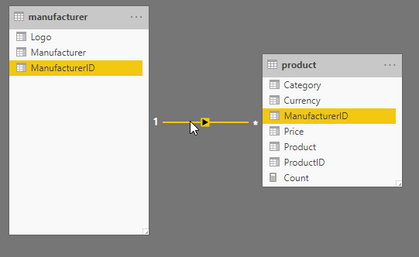
I have done some more testing and this seems to apply only when you have a matrix visual with columns from different tables, works fine to exclude/include in Desktop but not in Service.
Link to pbix here
Hi @Anonymous ,
I tried some samples like yours but they worked properly. Will the problem happen when you create this matrix in Service directly?
Hi @v-eachen-msft ,
Yes same behaviour when I create the matrix in service.
I have posted this as an Issue here and it got accepted, lets hope it get fixed soon.
Br
Adrian
Thank you for your reply, I have been using new look all the time.
Tested now to change to old and back to new but still cant exclude/include.
Br,
Adrian
Join us in Barcelona for FabCon and SQLCon, the Fabric, Power BI, SQL, and AI community event. Save €200 with code FABCMTY200.
Join Fabric Data Days 2026: 60 days of free live/on-demand sessions, challenges, study groups, and certification opportunities.
| User | Count |
|---|---|
| 16 | |
| 14 | |
| 9 | |
| 8 | |
| 8 |
| User | Count |
|---|---|
| 32 | |
| 29 | |
| 27 | |
| 25 | |
| 25 |