Get certified for free when you join Fabric Data Days 2026 and dive into Fabric, Power BI, SQL, AI, and other essential data skills.
Join nowData Days is here! Join us now for 60+ days of learning, challenges, and connection. Learn more
Hi all,
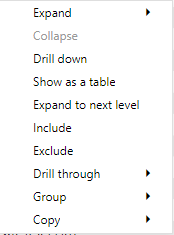
I have a matrix visual with 3 levels and when rightclicking in Desktop i get the option to Exclude/Include, but not when doing the same in Service. Anyone experienced this or have an explanation?
Desktop
Service
Thank you for being awsome!
Br,
Adrian
Hi @Anonymous ,
I have tested several reports but didn't find this issue. You could shift to New Look, some lost options may appear.
Here is a similar case for your reference:https://community.powerbi.com/t5/Service/Drillthrough-not-working-in-Service-Very-basic-example-atta...
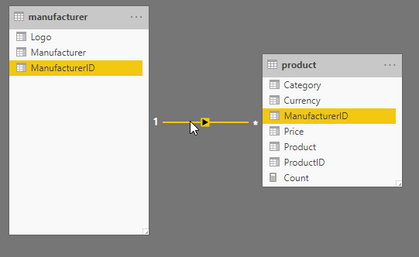
I have done some more testing and this seems to apply only when you have a matrix visual with columns from different tables, works fine to exclude/include in Desktop but not in Service.
Link to pbix here
Hi @Anonymous ,
I tried some samples like yours but they worked properly. Will the problem happen when you create this matrix in Service directly?
Hi @v-eachen-msft ,
Yes same behaviour when I create the matrix in service.
I have posted this as an Issue here and it got accepted, lets hope it get fixed soon.
Br
Adrian
Thank you for your reply, I have been using new look all the time.
Tested now to change to old and back to new but still cant exclude/include.
Br,
Adrian
Don't miss out on Data Days, June 15 through August 7. Learn Fabric, Power BI, SQL, AI and more.
Check out the May 2026 Power BI update to learn about new features.
| User | Count |
|---|---|
| 16 | |
| 10 | |
| 10 | |
| 8 | |
| 7 |
| User | Count |
|---|---|
| 41 | |
| 36 | |
| 34 | |
| 28 | |
| 20 |