This is best Fabric, Power BI, SQL and AI community event. How do we know? The last event sold out! Save €200 with code FABCMTY200.
Register nowA new Data Days event is coming soon! This time we’re going bigger than ever. Fabric, Power BI, SQL, AI and more. Don't miss out.
Hi all,
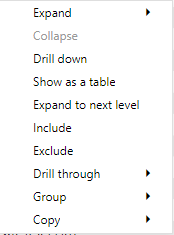
I have a matrix visual with 3 levels and when rightclicking in Desktop i get the option to Exclude/Include, but not when doing the same in Service. Anyone experienced this or have an explanation?
Desktop
Service
Thank you for being awsome!
Br,
Adrian
Hi @Anonymous ,
I have tested several reports but didn't find this issue. You could shift to New Look, some lost options may appear.
Here is a similar case for your reference:https://community.powerbi.com/t5/Service/Drillthrough-not-working-in-Service-Very-basic-example-atta...
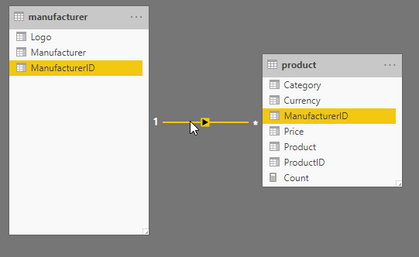
I have done some more testing and this seems to apply only when you have a matrix visual with columns from different tables, works fine to exclude/include in Desktop but not in Service.
Link to pbix here
Hi @Anonymous ,
I tried some samples like yours but they worked properly. Will the problem happen when you create this matrix in Service directly?
Hi @v-eachen-msft ,
Yes same behaviour when I create the matrix in service.
I have posted this as an Issue here and it got accepted, lets hope it get fixed soon.
Br
Adrian
Thank you for your reply, I have been using new look all the time.
Tested now to change to old and back to new but still cant exclude/include.
Br,
Adrian
Check out the May 2026 Power BI update to learn about new features.
Sign up to receive a private message when registration opens and key events begin.
If you have recently started exploring Fabric, we'd love to hear how it's going. Your feedback can help with product improvements.
| User | Count |
|---|---|
| 11 | |
| 10 | |
| 7 | |
| 7 | |
| 7 |
| User | Count |
|---|---|
| 28 | |
| 25 | |
| 22 | |
| 21 | |
| 21 |