cancel
Showing results for 
Search instead for 
Did you mean: 

July 28 - August 9 | Final Round of the Power BI Dataviz World Championships. This is your chance. Learn more

Reply
Anonymous
Not applicable

Direct Query Report gateway connection error

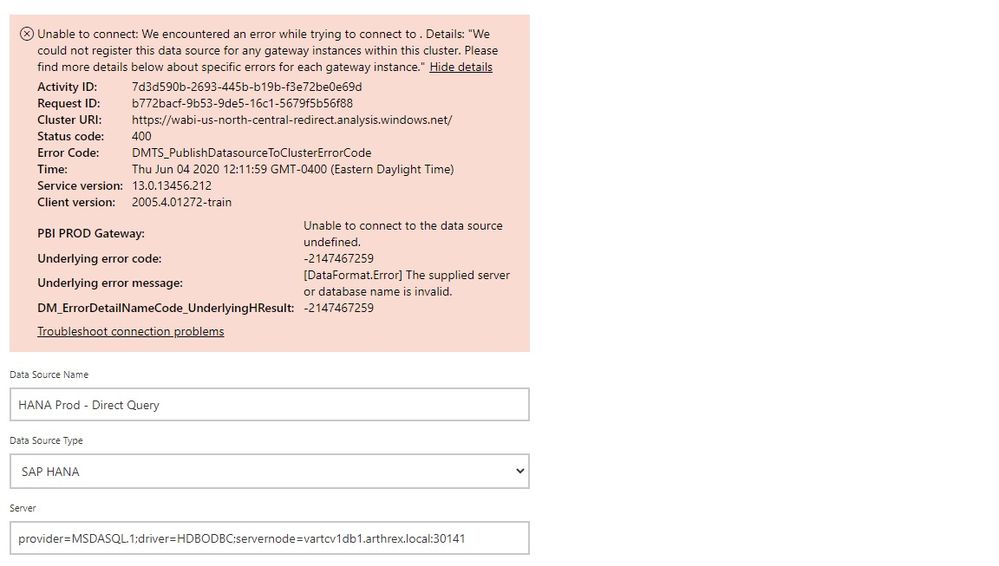
I was trying to setup an enterprise gateway connection for a direct query report however this is the error that was generated:

any clue why , this is very generic error

Gatewayerror.jpg

 
1 ACCEPTED SOLUTION
Anonymous
Not applicable

@Anonymous 

There can be many reason to this error. The 400 ERROR means a bad http request. Please updata on-premise gateway to the lastest version. If you already have updated the gateway to the latest version, then you can refer to steps below for troubleshooting.


1. Check if the server is using a proxy and the proxy. Some proxies restrict traffic to only ports 80 and 443. By default, communication to Azure Service Bus will occur on ports other than 443.

2. You can force the gateway to communicate with Azure Service Bus using HTTPS instead of direct TCP. You will need to modify the Microsoft.PowerBI.DataMovement.Pipeline.GatewayCore.dll.config file. Change the value from AutoDetect to Https. This file is located, by default, at C:\Program Files\On-premises data gateway.

3. Restart the gateway and check if the issue persists. 

  • To stop the service, run this command:

    ''' net stop PBIEgwService '''

  • To start the service, run this command:

    ''' net start PBIEgwService '''

4. You may export the data gateway log by selecting Diagnostics and then selecting the Export logs link near the bottom of the page. Reference: https://docs.microsoft.com/en-us/power-bi/service-gateway-onprem-tshoot#tools-for-troubleshooting.


If the issue is not solved and urgent, I would suggest you to create a support ticket for a deeper help.


Paul Zheng _ Community Support Team
If this post helps, then please consider Accept it as the solution to help the other members find it more quickly.

View solution in original post

1 REPLY 1
Anonymous
Not applicable

@Anonymous 

There can be many reason to this error. The 400 ERROR means a bad http request. Please updata on-premise gateway to the lastest version. If you already have updated the gateway to the latest version, then you can refer to steps below for troubleshooting.


1. Check if the server is using a proxy and the proxy. Some proxies restrict traffic to only ports 80 and 443. By default, communication to Azure Service Bus will occur on ports other than 443.

2. You can force the gateway to communicate with Azure Service Bus using HTTPS instead of direct TCP. You will need to modify the Microsoft.PowerBI.DataMovement.Pipeline.GatewayCore.dll.config file. Change the value from AutoDetect to Https. This file is located, by default, at C:\Program Files\On-premises data gateway.

3. Restart the gateway and check if the issue persists. 

  • To stop the service, run this command:

    ''' net stop PBIEgwService '''

  • To start the service, run this command:

    ''' net start PBIEgwService '''

4. You may export the data gateway log by selecting Diagnostics and then selecting the Export logs link near the bottom of the page. Reference: https://docs.microsoft.com/en-us/power-bi/service-gateway-onprem-tshoot#tools-for-troubleshooting.


If the issue is not solved and urgent, I would suggest you to create a support ticket for a deeper help.


Paul Zheng _ Community Support Team
If this post helps, then please consider Accept it as the solution to help the other members find it more quickly.

Helpful resources

Announcements
Fabric Community Sticker Design Challenge Barcelona Carousel

Fabric Community Sticker Challenge - Barcelona 2026

If you love stickers, then you will definitely want to check out our community sticker challenge, Barcelona edition!

July Power BI Update Carousel

Power BI Monthly Update - July 2026

Check out the July 2026 Power BI update to learn about new features.

Power BI DataViz World Championships carousel

Power BI DataViz World Championships - June 2026

A new Power BI DataViz World Championship is coming this June! Don't miss out on submitting your entry.

Top Kudoed Authors