Don't miss your chance to take the Fabric Data Engineer (DP-700) exam on us!
Learn moreNext up in the FabCon + SQLCon recap series: The roadmap for Microsoft SQL and Maximizing Developer experiences in Fabric. All sessions are available on-demand after the live show. Register now
Dear Community,
I have created a small testing Datamart based on this brand-new functionality. Works really well in the service/browser.
Would love to test that I can connect to my PBI Datamart through ADS or SSMS and I seem to be failing on 2 counts:
1. When I Shared the Datamart with myself (i.e., I enter my own AD name and presumably send myself an email with a connection string) nothing arrives
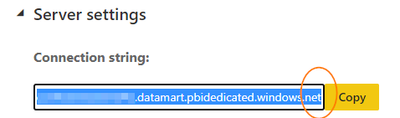
2. When I look at the Settings of the Datamart and copy the Connection string from there it seems to be missing a port number (screenshot below)
Whilst I can imagine some email filtering is getting in the way of option (1), which I'll raise within my Organisation, I hoped that option (2) would work 'immediately'. Does anyone know if it's a standard port number? Or is it dynamically generated as part of the sharing permission?
* I tried using the port number that was displayed on the Intro video MS released and it didn't work
Many thanks, James
Hi James,
If Private Endpoints are not enabled it might be a problem of your organization's firewall blocking outbound connections to port 1433. Could you try connecting from a device outside of your organization's network? If that also doesn't work please open a support ticket and give us some identifiers like your datamart url or endpoint you're trying to connect to.
Thanks,
Marek
If you have recently started exploring Fabric, we'd love to hear how it's going. Your feedback can help with product improvements.
A new Power BI DataViz World Championship is coming this June! Don't miss out on submitting your entry.
Share feedback directly with Fabric product managers, participate in targeted research studies and influence the Fabric roadmap.