cancel
Showing results for 
Search instead for 
Did you mean: 

July 7 - July 17 | Round 2 of the Power BI Dataviz World Championships. Don't miss your chance! Learn more

Reply
Bi2thelly
Helper II
Helper II

Dataflow Converting List back into a Table

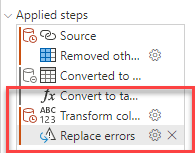
I'm new at creating Dataflows and I'm running into an issue where if I try to filter a table off of a column (TableA[Column1]) from another table the query will timeout. However, if I run the same query but reference an actual entity that is a List (ListA). I need the list to be dynamic so when I update the table in Sharepoint it will update here as well. I've used the following syntax:


Works good:

OptA: Table.SelectRows(#"Navigation 1", each List.Contains(ListA, [ID]) = true)

OptB: Table.SelectRows(#"Navigation 1", each (List.Contains(ListA, [ID]) = true)) -- works but much slower


Does not work (timesout): 

Opt1: Table.SelectRows(#"Navigation 1", each List.Contains(TableA[Column1], [ID]) = true)

Opt2: Table.SelectRows(#"Navigation 1", each (List.Contains(TableA[Column1], [ID]) = true))

Opt3: Table.SelectRows(#"Navigation 1", each (List.Contains(TableA[Column1], [ID])))

Opt4: Table.SelectRows(#"Navigation 1", each List.Contains(TableA[Column1], [ID]))


So I have been trying to turn TableA[Column1] into an actual List and in Power Bi desktop it will allow me to do so BUT in Power Query online with the Dataflow, everytime I turn the column into a list, Power query then converts back into a table. I need to be able to convert TableA[Column1] to a list or somehow to be able to filter another table by that column so it can be dynamic. I also tried to merge but that timesout as well.


Any ideas to get around this?
 

Bi2thelly_0-1632933996924.png


5 REPLIES 5
Mogsetsu
New Member

In case anyone else stumbles into this. I had the same issue of the dataflow converting my list to a table. I was able to prevent this by right-clicking the query and unchecking "Enable Load".

lbendlin
Super User
Super User

When you convert the table column into a list, is the table a single column table at that time or does it have other columns too?  If the latter then it might be worth trying to change TableA into a single column table before converting it into a list.


I think you should raise a bug/issue report, this seems to be silly behavior (like a lot of the steps that the online Power Query editor is adding for no good reason).

How do you raise an issue?

It is a single column.

Helpful resources

Announcements
FabCon and SQLCon Barcelona 2026

FabCon & SQLCon – Barcelona 2026

Join us in Barcelona for FabCon and SQLCon, the Fabric, Power BI, SQL, and AI community event. Save €200 with code FABCMTY200.

60 days of Data Days Carousel

Data Days 2026

Join Fabric Data Days 2026: 60 days of free live/on-demand sessions, challenges, study groups, and certification opportunities.

Power BI DataViz World Championships carousel

Power BI DataViz World Championships - June 2026

A new Power BI DataViz World Championship is coming this June! Don't miss out on submitting your entry.