I'm new at creating Dataflows and I'm running into an issue where if I try to filter a table off of a column (TableA[Column1]) from another table the query will timeout. However, if I run the same query but reference an actual entity that is a List (ListA). I need the list to be dynamic so when I update the table in Sharepoint it will update here as well. I've used the following syntax:
Works good:
OptA: Table.SelectRows(#"Navigation 1", each List.Contains(ListA, [ID]) = true)
OptB: Table.SelectRows(#"Navigation 1", each (List.Contains(ListA, [ID]) = true)) -- works but much slower
Does not work (timesout):
Opt1: Table.SelectRows(#"Navigation 1", each List.Contains(TableA[Column1], [ID]) = true)
Opt2: Table.SelectRows(#"Navigation 1", each (List.Contains(TableA[Column1], [ID]) = true))
Opt3: Table.SelectRows(#"Navigation 1", each (List.Contains(TableA[Column1], [ID])))
Opt4: Table.SelectRows(#"Navigation 1", each List.Contains(TableA[Column1], [ID]))
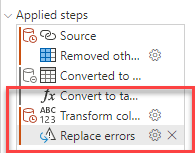
So I have been trying to turn TableA[Column1] into an actual List and in Power Bi desktop it will allow me to do so BUT in Power Query online with the Dataflow, everytime I turn the column into a list, Power query then converts back into a table. I need to be able to convert TableA[Column1] to a list or somehow to be able to filter another table by that column so it can be dynamic. I also tried to merge but that timesout as well.
Any ideas to get around this?