cancel
Showing results for 
Search instead for 
Did you mean: 

The Power BI Data Visualization World Championships is back! Get ahead of the game and start preparing now! Learn more

Reply
chriss06
New Member

Data Flow, SQL Server on the cloud, gateways

Hi,


I have been trying to create my data flow and connect it to my SQL Server hosted on the cloud (on Ubuntu 18.04).

The problem is that I receive the following message : "Unexpected error: Session ID ...."


It's working only when I create and use a gateway on-premise installed on my local computer.


But I shouldn't need this gatewate given that my source is not on-premise... And it's not convenient at all because it would mean that my PC has to be open 24/7 if I want to perform regular data refresh.


What could be the easiest solution?


Thanks

4 REPLIES 4
Icey
Community Support
Community Support

Hi @chriss06 ,


Azure SQL Database doesn't support Azure Active Directory authentication.

Reference: 

https://docs.microsoft.com/en-us/power-bi/service-dataflows-create-use#troubleshooting-data-connecti....


Please try this:

Setup a new SQL Server user in Azure SQL Database, and connect via that login, using the 'Basic' Authentication option in Power Query.

Reference: 

https://community.powerbi.com/t5/Service/Connecting-to-Azure-SQL-Database-via-Dataflows-authenticati....


Best Regards,

Icey


If this post helps, then please consider Accept it as the solution to help the other members find it more quickly.

Hello @Icey ,

I am not using the Azure Active Directory authentification given that I am not using Azure SQL Database as source.


I was trying to use Microsoft SQL Server as source with a Basic authentification. Is there actually no way to connect to this source through the dataflow without an on-premise PowerBI gateway?

Same problem with MySQL by the way...


Christophe


Icey
Community Support
Community Support

Hi @chriss06 ,


I guess your SQL Server and MySQL on Ubuntu 18.04 are behind a firewall, require a VPN, or are on virtual networks. Please check.

If so, you might need a data gateway.

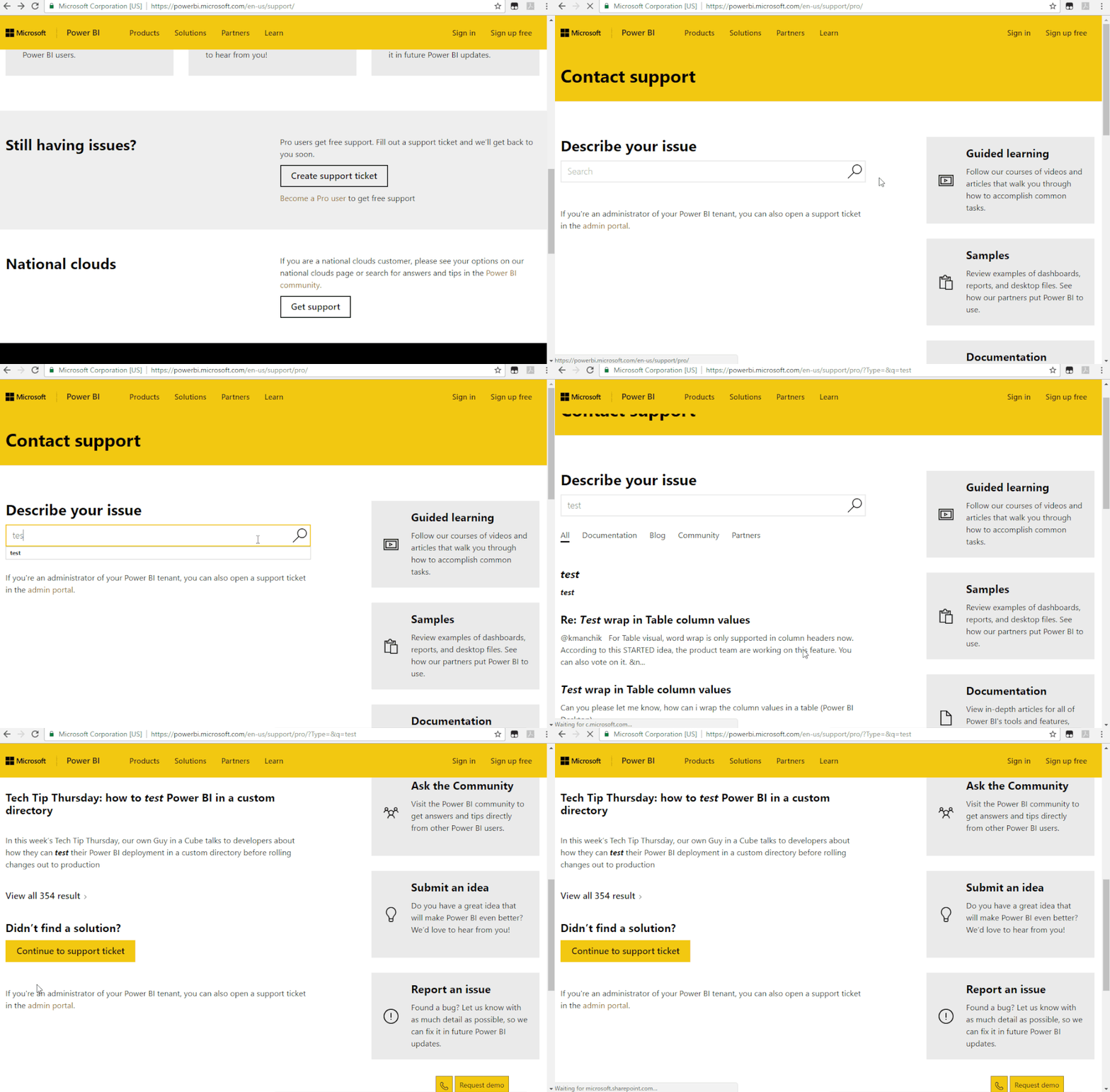
If not, I suggest you to create a support ticket to get further help, if you are a pro user.

Support Ticket.gif


Best Regards,

Icey


If this post helps, then please consider Accept it as the solution to help the other members find it more quickly.

Greg_Deckler
Community Champion
Community Champion

You could check the Issues forum here:

https://community.powerbi.com/t5/Issues/idb-p/Issues

And if it is not there, then you could post it.

If you have Pro account you could try to open a support ticket. If you have a Pro account it is free. Go to https://support.powerbi.com. Scroll down and click "CREATE SUPPORT TICKET".


Follow on LinkedIn
@ me in replies or I'll lose your thread!!!
Instead of a Kudo, please vote for this idea
Become an expert!: Enterprise DNA
External Tools: MSHGQM
YouTube Channel!: Microsoft Hates Greg
Latest book!:
DAX For Humans

DAX is easy, CALCULATE makes DAX hard...

Helpful resources

Announcements
Power BI DataViz World Championships

Power BI Dataviz World Championships

The Power BI Data Visualization World Championships is back! Get ahead of the game and start preparing now!

December 2025 Power BI Update Carousel

Power BI Monthly Update - December 2025

Check out the December 2025 Power BI Holiday Recap!

FabCon Atlanta 2026 carousel

FabCon Atlanta 2026

Join us at FabCon Atlanta, March 16-20, for the ultimate Fabric, Power BI, AI and SQL community-led event. Save $200 with code FABCOMM.