This time we’re going bigger than ever. Fabric, Power BI, SQL, AI and more. We're covering it all. You won't want to miss it.
Learn moreLevel up your Power BI skills this month - build one visual each week and tell better stories with data! Get started
Hi All,
I am using Cluster Column Chart to compare Actual vs Target in Revenue and would like to apply conditional formatting to the "Actual" columns such that it will be green if Actual >= Target and red if Actual < Target.
X Axis - Country
Y Axis - Actual
Y Axis - Target
However, I am unable to find the "fx" button under Columns to apply the conditional formatting. I am currently using the April 2022 version. Is there another way to apply the conditional formatting?
Solved! Go to Solution.
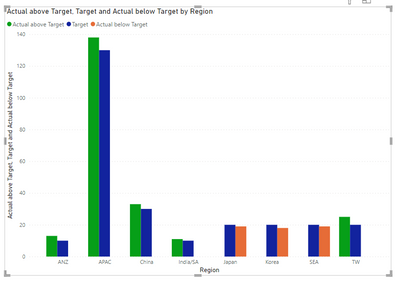
see attached. I cheated by separating the scenarios into different columns Then I cheated again by arranging the value fields in a certain order.
Sample data:
| Country | Actual | Target |
APAC | 138 | 130 |
| China | 33 | 30 |
| Japan | 19 | 20 |
| India/SA | 11 | 10 |
| ANZ | 13 | 10 |
| Korea | 18 | 20 |
| SEA | 19 | 20 |
| TW | 25 | 20 |
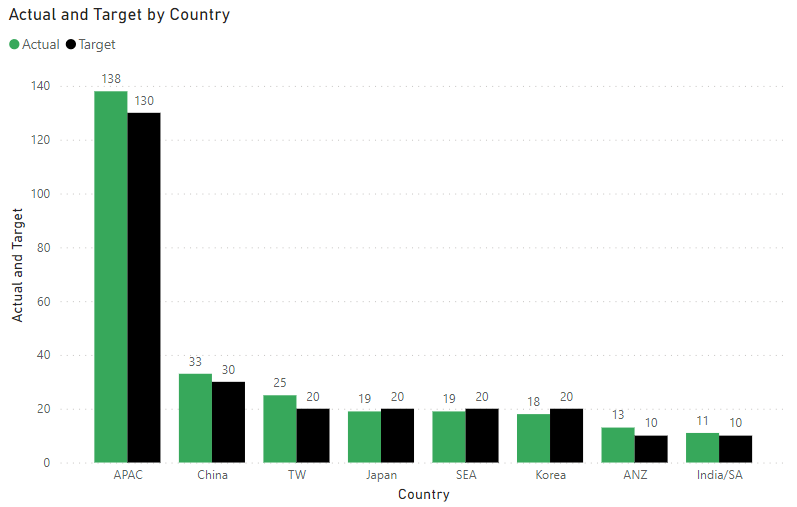
Clustered Column Chart:
Would like to have Actual that are more than the corresponding Target to be in green and red when lower than the corresponding Target, i.e. columns of APAC, China, TW & ANZ to remain green and the columns of Japan, SEA and Korea to be in red.
Like this?
Yes, this will work. May I know how did you achieve this as i am wondering whether it will be feasible for a huge data set (without doing much manual adjustment to the data set, or none at all if possible)?
Guess this works. Thank you! 👍
You may need separate Actual series. Please provide sanitized sample data that fully covers your issue.
Please show the expected outcome based on the sample data you provided.
Check out the April 2026 Power BI update to learn about new features.
Sign up to receive a private message when registration opens and key events begin.
If you have recently started exploring Fabric, we'd love to hear how it's going. Your feedback can help with product improvements.
| User | Count |
|---|---|
| 11 | |
| 8 | |
| 8 | |
| 7 | |
| 7 |
| User | Count |
|---|---|
| 50 | |
| 27 | |
| 24 | |
| 24 | |
| 22 |