cancel
Showing results for 
Search instead for 
Did you mean: 

Learn from the best! Meet the four finalists headed to the FINALS of the Power BI Dataviz World Championships! Register now

Reply
Elston
New Member

Conditional Formatting in Clustered Column Chart

Hi All,


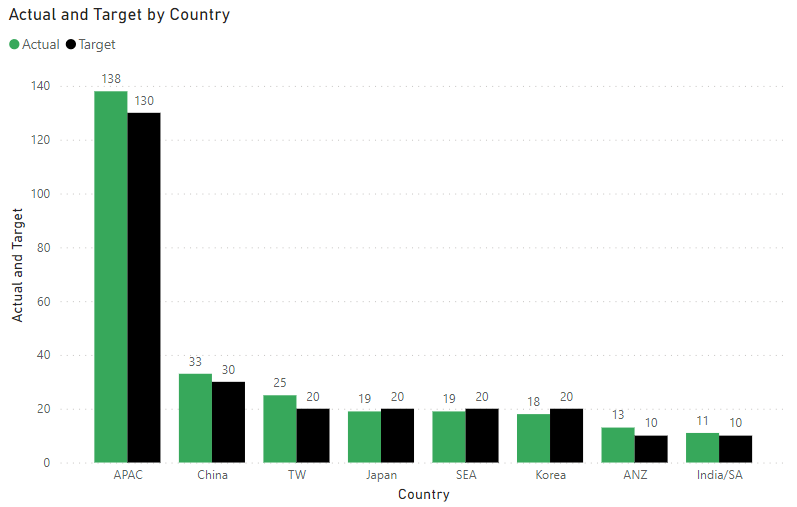
I am using Cluster Column Chart to compare Actual vs Target in Revenue and would like to apply conditional formatting to the "Actual" columns such that it will be green if Actual >= Target and red if Actual < Target.

X Axis - Country

Y Axis - Actual

Y Axis - Target


However, I am unable to find the "fx" button under Columns to apply the conditional formatting. I am currently using the April 2022 version. Is there another way to apply the conditional formatting? 

1 ACCEPTED SOLUTION

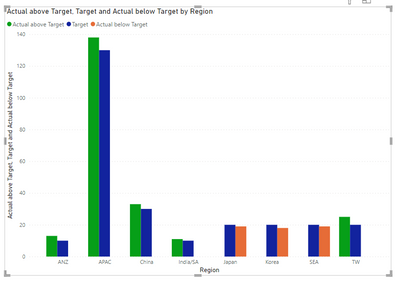
see attached. I cheated by separating the scenarios into different columns Then I cheated again by arranging the value fields in a certain order.

View solution in original post

6 REPLIES 6
Elston
New Member

Sample data:

CountryActualTarget

APAC

138130
China3330
Japan1920
India/SA1110
ANZ1310
Korea1820
SEA1920
TW2520


Clustered Column Chart:

Elston_1-1652844932272.png

Would like to have Actual that are more than the corresponding Target to be in green and red when lower than the corresponding Target, i.e. columns of APAC, China, TW & ANZ to remain green and the columns of Japan, SEA and Korea to be in red.


Like this?


lbendlin_0-1652899979318.png


Yes, this will work. May I know how did you achieve this as i am wondering whether it will be feasible for a huge data set (without doing much manual adjustment to the data set, or none at all if possible)?

see attached. I cheated by separating the scenarios into different columns Then I cheated again by arranging the value fields in a certain order.

Guess this works. Thank you! 👍

lbendlin
Super User
Super User

You may need separate Actual series. Please provide sanitized sample data that fully covers your issue.

Please show the expected outcome based on the sample data you provided.

Helpful resources

Announcements
Join our Fabric User Panel

Join our Fabric User Panel

Share feedback directly with Fabric product managers, participate in targeted research studies and influence the Fabric roadmap.

February Power BI Update Carousel

Power BI Monthly Update - February 2026

Check out the February 2026 Power BI update to learn about new features.

FabCon Atlanta 2026 carousel

FabCon Atlanta 2026

Join us at FabCon Atlanta, March 16-20, for the ultimate Fabric, Power BI, AI and SQL community-led event. Save $200 with code FABCOMM.