Get certified for free when you join Fabric Data Days 2026 and dive into Fabric, Power BI, SQL, AI, and other essential data skills.
Join nowJuly 7 - July 17 | Round 2 of the Power BI Dataviz World Championships. Don't miss your chance! Learn more
Hi All,
I am using Cluster Column Chart to compare Actual vs Target in Revenue and would like to apply conditional formatting to the "Actual" columns such that it will be green if Actual >= Target and red if Actual < Target.
X Axis - Country
Y Axis - Actual
Y Axis - Target
However, I am unable to find the "fx" button under Columns to apply the conditional formatting. I am currently using the April 2022 version. Is there another way to apply the conditional formatting?
Solved! Go to Solution.
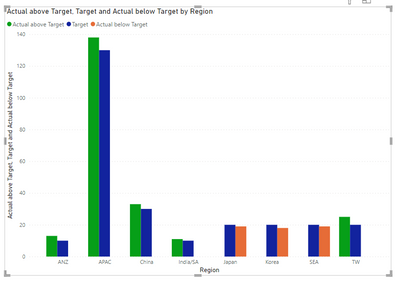
see attached. I cheated by separating the scenarios into different columns Then I cheated again by arranging the value fields in a certain order.
Sample data:
| Country | Actual | Target |
APAC | 138 | 130 |
| China | 33 | 30 |
| Japan | 19 | 20 |
| India/SA | 11 | 10 |
| ANZ | 13 | 10 |
| Korea | 18 | 20 |
| SEA | 19 | 20 |
| TW | 25 | 20 |
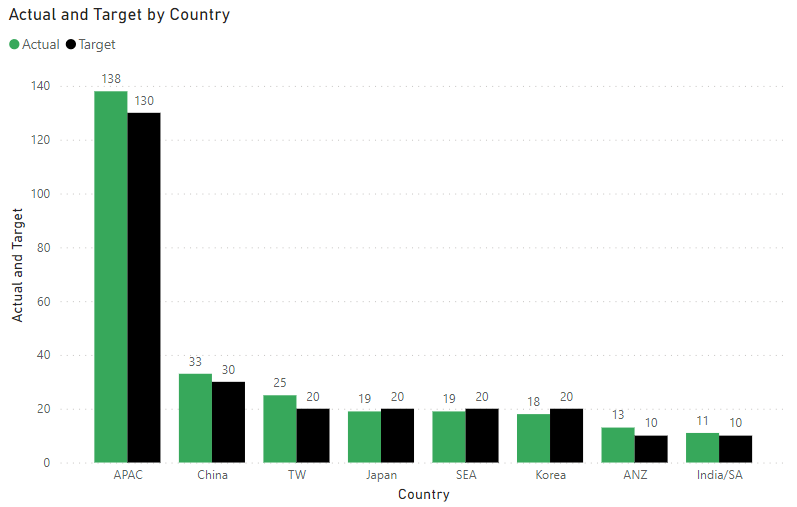
Clustered Column Chart:
Would like to have Actual that are more than the corresponding Target to be in green and red when lower than the corresponding Target, i.e. columns of APAC, China, TW & ANZ to remain green and the columns of Japan, SEA and Korea to be in red.
Like this?
Yes, this will work. May I know how did you achieve this as i am wondering whether it will be feasible for a huge data set (without doing much manual adjustment to the data set, or none at all if possible)?
Guess this works. Thank you! 👍
You may need separate Actual series. Please provide sanitized sample data that fully covers your issue.
Please show the expected outcome based on the sample data you provided.
Join us in Barcelona for FabCon and SQLCon, the Fabric, Power BI, SQL, and AI community event. Save €200 with code FABCMTY200.
Join Fabric Data Days 2026: 60 days of free live/on-demand sessions, challenges, study groups, and certification opportunities.
| User | Count |
|---|---|
| 16 | |
| 14 | |
| 9 | |
| 9 | |
| 8 |
| User | Count |
|---|---|
| 33 | |
| 29 | |
| 27 | |
| 25 | |
| 25 |