cancel
Showing results for 
Search instead for 
Did you mean: 

The Power BI Data Visualization World Championships is back! Get ahead of the game and start preparing now! Learn more

Reply
Anonymous
Not applicable

Conditional Colors

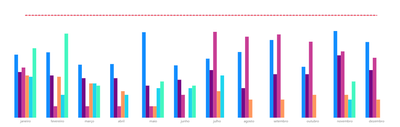
I created a bar chart with a limit line, but each bar is from a different base that I did the data modeling.

I am not finding the option to make a conditional color that if it is greater than the boundary line turns red, if it is less than the boundary line turns green.

can you help me ?


Gabrielm97_1-1593527643109.png


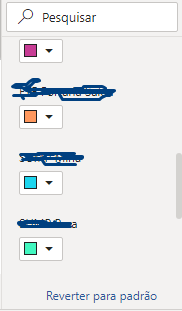
You do not have the option of conditional formatting in colors.


Gabrielm97_2-1593527696214.png


1 ACCEPTED SOLUTION
TomMartens
Super User
Super User

Hey @Anonymous ,


this is simply not possible, as Power BI does not allow to change the fill color if the color is used for identifying the single "member" inside a cluster. The fill color will be automatically applied to the members inside a cluster, based on the color in the legend (the single member). It's not possible to overwrite the fill color using conditional formatting.


Maybe, you will create an idea on ideas.powerbi.com


Regards,

Tom


Did I answer your question? Mark my post as a solution, this will help others!

Proud to be a Super User!
I accept Kudos 😉
Hamburg, Germany

View solution in original post

2 REPLIES 2
v-diye-msft
Community Support
Community Support

Hi,


If the above post helps, could you please consider Accept it as the solution to help the other members find it more quickly. thanks!


Community Support Team _ Dina Ye
If this post helps, then please consider Accept it as the solution to help the other members find it more
quickly.
TomMartens
Super User
Super User

Hey @Anonymous ,


this is simply not possible, as Power BI does not allow to change the fill color if the color is used for identifying the single "member" inside a cluster. The fill color will be automatically applied to the members inside a cluster, based on the color in the legend (the single member). It's not possible to overwrite the fill color using conditional formatting.


Maybe, you will create an idea on ideas.powerbi.com


Regards,

Tom


Did I answer your question? Mark my post as a solution, this will help others!

Proud to be a Super User!
I accept Kudos 😉
Hamburg, Germany

Helpful resources

Announcements
Power BI DataViz World Championships

Power BI Dataviz World Championships

The Power BI Data Visualization World Championships is back! Get ahead of the game and start preparing now!

December 2025 Power BI Update Carousel

Power BI Monthly Update - December 2025

Check out the December 2025 Power BI Holiday Recap!

FabCon Atlanta 2026 carousel

FabCon Atlanta 2026

Join us at FabCon Atlanta, March 16-20, for the ultimate Fabric, Power BI, AI and SQL community-led event. Save $200 with code FABCOMM.