cancel
Showing results for 
Search instead for 
Did you mean: 

A new Data Days event is coming soon! This time we’re going bigger than ever. Fabric, Power BI, SQL, AI and more. Don't miss out.

Reply
JulianTobon
Helper I
Helper I

Change SQL Server IP address Analysis services from data sources

Hello


Currently in our company, we have 4 cubes deployed in our server named BI with an IP address XXX.XXX.XX.XX. We have connected Power BI to these data sources through (SQL Analysis Services) and the Gateway is working. Are 4 Data sources with the same IP address and a group of reports have been developed in Power BI.

By infrastructure theme we must migrate this server, so the IP address will change. We are concerned about the subject of data origins, so I ask them:

Can the source data address be edited in Power BI?
What happens to reports already designed and pointing to that address?


Thanks

3 REPLIES 3
v-ljerr-msft
Microsoft Employee
Microsoft Employee

Hi @JulianTobon,


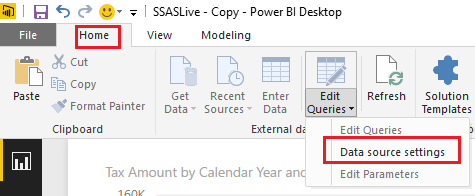
You should be able to change the source data address by clicking Data source settings under Home tab > Edit Queries.


as.PNG


The reports already designed and pointing to that address won't be affected, and will still work in this scenario. Smiley Happy


Regards

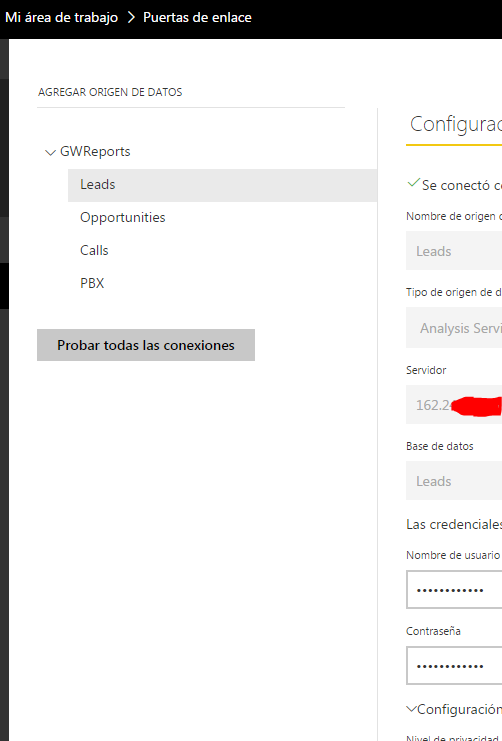
Is in Power BI Web no in Power Bi desktop Man Frustrated


Captura.PNG


Hi @JulianTobon,


I don't think there is an option to change the server address of an existing Analysis services within a Gateway on Power BI Service currently. 


In your scenario, you can just add a new data source for your Analysis services with the new IP address within your Gateway on Power BI Service. And you still need to change the data source settings to the new IP address on Power BI Desktop, then republish it to Power BI service. So that the reports already designed and pointing to that address won't be affected, and will still work. Smiley Happy


Regards

Helpful resources

Announcements
May Power BI Update Carousel

Power BI Monthly Update - May 2026

Check out the May 2026 Power BI update to learn about new features.

Fabric SQL PBI Data Days

Data Days 2026 coming soon!

Sign up to receive a private message when registration opens and key events begin.

New to Fabric survey Carousel

New to Fabric Survey

If you have recently started exploring Fabric, we'd love to hear how it's going. Your feedback can help with product improvements.

Power BI DataViz World Championships carousel

Power BI DataViz World Championships - June 2026

A new Power BI DataViz World Championship is coming this June! Don't miss out on submitting your entry.