cancel
Showing results for 
Search instead for 
Did you mean: 

July 7 - July 17 | Round 2 of the Power BI Dataviz World Championships. Don't miss your chance! Learn more

Reply
JulianTobon
Helper I
Helper I

Change SQL Server IP address Analysis services from data sources

Hello


Currently in our company, we have 4 cubes deployed in our server named BI with an IP address XXX.XXX.XX.XX. We have connected Power BI to these data sources through (SQL Analysis Services) and the Gateway is working. Are 4 Data sources with the same IP address and a group of reports have been developed in Power BI.

By infrastructure theme we must migrate this server, so the IP address will change. We are concerned about the subject of data origins, so I ask them:

Can the source data address be edited in Power BI?
What happens to reports already designed and pointing to that address?


Thanks

3 REPLIES 3
v-ljerr-msft
Microsoft Employee
Microsoft Employee

Hi @JulianTobon,


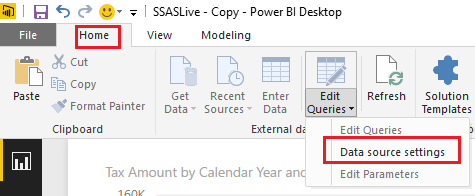
You should be able to change the source data address by clicking Data source settings under Home tab > Edit Queries.


as.PNG


The reports already designed and pointing to that address won't be affected, and will still work in this scenario. Smiley Happy


Regards

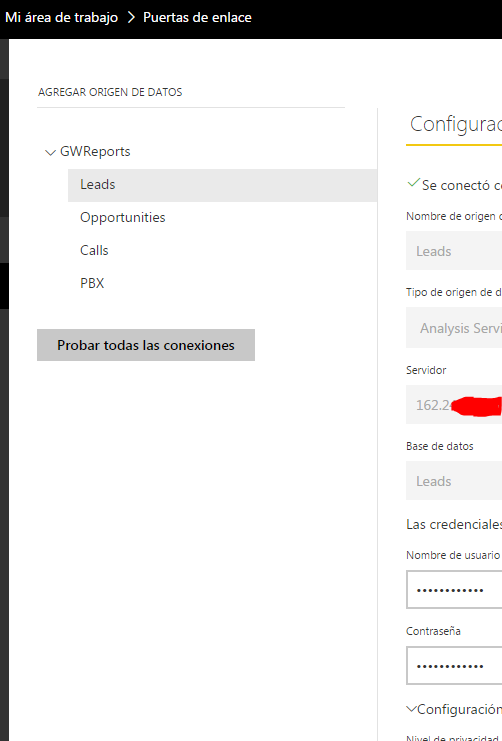
Is in Power BI Web no in Power Bi desktop Man Frustrated


Captura.PNG


Hi @JulianTobon,


I don't think there is an option to change the server address of an existing Analysis services within a Gateway on Power BI Service currently. 


In your scenario, you can just add a new data source for your Analysis services with the new IP address within your Gateway on Power BI Service. And you still need to change the data source settings to the new IP address on Power BI Desktop, then republish it to Power BI service. So that the reports already designed and pointing to that address won't be affected, and will still work. Smiley Happy


Regards

Helpful resources

Announcements
FabCon and SQLCon Barcelona 2026

FabCon & SQLCon – Barcelona 2026

Join us in Barcelona for FabCon and SQLCon, the Fabric, Power BI, SQL, and AI community event. Save €200 with code FABCMTY200.

Fabric Community Sticker Design Challenge Barcelona Carousel

Fabric Community Sticker Challenge - Barcelona 2026

If you love stickers, then you will definitely want to check out our community sticker challenge, Barcelona edition!

July Power BI Update Carousel

Power BI Monthly Update - July 2026

Check out the July 2026 Power BI update to learn about new features.

Power BI DataViz World Championships carousel

Power BI DataViz World Championships - June 2026

A new Power BI DataViz World Championship is coming this June! Don't miss out on submitting your entry.

Top Kudoed Authors