Get certified for free when you join Fabric Data Days 2026 and dive into Fabric, Power BI, SQL, AI, and other essential data skills.
Join nowJuly 7 - July 17 | Round 2 of the Power BI Dataviz World Championships. Don't miss your chance! Learn more
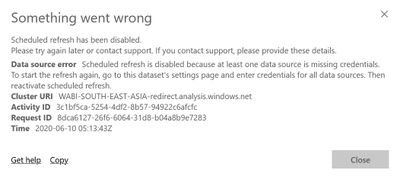
I have connected Qualtrics through Qualtrics API V3, it's working fine in PowerBI Desktop however when i publish it to the service then it's giving me some refresh error-
I have used python script in order to get data from Qualtrics API. Refresh is working fine in Power BI desktop but giving error in service.
I have tried Gateway as well, but no luck. Please let me know your views...
Solved! Go to Solution.
Hi @Anonymous ,
Scheduled refresh can be implemented in power Bi service through the personal gateway for Python scripts. The steps are as follows:
Install personal Gateway - you need to install the personal gateway in the location of the file and on the computer where Python is installed.
Enable scheduled refresh for datasets - you need to use Python scripts to enable scheduled refresh for datasets.
You can refer to the links: install and configure gateway, configure the schedule refresh .
BTW,it is not supported to implement schedule refresh via on premise Data Gateway (Enterprise Gateway) for Python in Power BI Service currently .There is an idea about this issue, please vote it up https://ideas.powerbi.com/forums/265200-power-bi-ideas/suggestions/37724956-provide-enterprise-gatew... to improve the Power BI.
You can also refer to this thread:https://community.powerbi.com/t5/Service/Schedule-refresh-of-Python-script-in-Power-BI-Service/m-p/1...
Best Regards,
Liang
If this post helps, then please consider Accept it as the solution to help the other members find it more quickly.
Hi @Anonymous ,
Scheduled refresh can be implemented in power Bi service through the personal gateway for Python scripts. The steps are as follows:
Install personal Gateway - you need to install the personal gateway in the location of the file and on the computer where Python is installed.
Enable scheduled refresh for datasets - you need to use Python scripts to enable scheduled refresh for datasets.
You can refer to the links: install and configure gateway, configure the schedule refresh .
BTW,it is not supported to implement schedule refresh via on premise Data Gateway (Enterprise Gateway) for Python in Power BI Service currently .There is an idea about this issue, please vote it up https://ideas.powerbi.com/forums/265200-power-bi-ideas/suggestions/37724956-provide-enterprise-gatew... to improve the Power BI.
You can also refer to this thread:https://community.powerbi.com/t5/Service/Schedule-refresh-of-Python-script-in-Power-BI-Service/m-p/1...
Best Regards,
Liang
If this post helps, then please consider Accept it as the solution to help the other members find it more quickly.
Hi @V-lianl-msft ,
Thanks for your response.
As you mentioned "you need to install the personal gateway in the location of the file and on the computer where Python is installed."
I am fetching dataset from Qualtrics server into PowerBI Desktop using Qualtircs API in Python- See below how i achieve that-
I have installed personal gateway in my system but i can't install gateway in Qualtrics server.
Please suggest.
Hi @Anonymous ,
You can refer to the solution of this thread:https://community.powerbi.com/t5/Service/Schedule-refresh-of-Python-script-in-Power-BI-Service/m-p/1...
Best Regards,
Liang
If this post helps, then please consider Accept it as the solution to help the other members find it more quickly.
Join us in Barcelona for FabCon and SQLCon, the Fabric, Power BI, SQL, and AI community event. Save €200 with code FABCMTY200.
Join Fabric Data Days 2026: 60 days of free live/on-demand sessions, challenges, study groups, and certification opportunities.
| User | Count |
|---|---|
| 15 | |
| 14 | |
| 12 | |
| 11 | |
| 8 |
| User | Count |
|---|---|
| 40 | |
| 36 | |
| 29 | |
| 27 | |
| 24 |