Get certified for free when you join Fabric Data Days 2026 and dive into Fabric, Power BI, SQL, AI, and other essential data skills.
Join nowJuly 7 - July 17 | Round 2 of the Power BI Dataviz World Championships. Don't miss your chance! Learn more
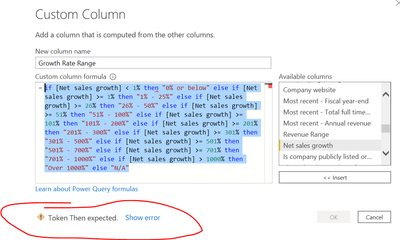
Hi- Can someone please help me what wrong I'm doing with the formula to get the error?
=if [Net sales growth] < 1% then "0% or below" else if [Net sales growth] >= 1% then "1% - 25%" else if [Net sales growth] >= 26% then "26% - 50%" else if [Net sales growth] >= 51% then "51% - 100%" else if [Net sales growth] >= 101% then "101% - 200%" else if [Net sales growth] >= 201% then "201% - 300%" else if [Net sales growth] >= 301% then "301% - 500%" else if [Net sales growth] >= 501% then "501% - 700%" else if [Net sales growth] >= 701% then "701% - 1000%" else if [Net sales growth] > 1000% then "Over 1000%" else "N/A"
Solved! Go to Solution.
Hi @sks2701
It must be the % character. You can't use it like that. Instead of 1% use the number: 1/100 or 0.01. Same for all other % instances in the code
Please mark the question solved when done and consider giving a thumbs up if posts are helpful.
Contact me privately for support with any larger-scale BI needs, tutoring, etc.
Cheers
Hi @sks2701
Make sure to replace all % values where you are representing a number e.g.
if [Net sales growth] < 0.01
else if [Net sales growth] >= 0.26
etc.
Phil
If I answered your question please mark my post as the solution.
If my answer helped solve your problem, give it a kudos by clicking on the Thumbs Up.
Proud to be a Super User!
Hi @sks2701
Make sure to replace all % values where you are representing a number e.g.
if [Net sales growth] < 0.01
else if [Net sales growth] >= 0.26
etc.
Phil
If I answered your question please mark my post as the solution.
If my answer helped solve your problem, give it a kudos by clicking on the Thumbs Up.
Proud to be a Super User!
THANK YOU! It helped 🙂
Hi @sks2701
It must be the % character. You can't use it like that. Instead of 1% use the number: 1/100 or 0.01. Same for all other % instances in the code
Please mark the question solved when done and consider giving a thumbs up if posts are helpful.
Contact me privately for support with any larger-scale BI needs, tutoring, etc.
Cheers
thank you !
Join us in Barcelona for FabCon and SQLCon, the Fabric, Power BI, SQL, and AI community event. Save €200 with code FABCMTY200.
Join Fabric Data Days 2026: 60 days of free live/on-demand sessions, challenges, study groups, and certification opportunities.
| User | Count |
|---|---|
| 8 | |
| 6 | |
| 5 | |
| 5 | |
| 4 |