This is best Fabric, Power BI, SQL and AI community event. How do we know? The last event sold out! Save €200 with code FABCMTY200.
Register nowA new Data Days event is coming soon! This time we’re going bigger than ever. Fabric, Power BI, SQL, AI and more. Don't miss out.
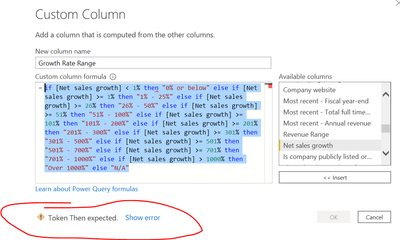
Hi- Can someone please help me what wrong I'm doing with the formula to get the error?
=if [Net sales growth] < 1% then "0% or below" else if [Net sales growth] >= 1% then "1% - 25%" else if [Net sales growth] >= 26% then "26% - 50%" else if [Net sales growth] >= 51% then "51% - 100%" else if [Net sales growth] >= 101% then "101% - 200%" else if [Net sales growth] >= 201% then "201% - 300%" else if [Net sales growth] >= 301% then "301% - 500%" else if [Net sales growth] >= 501% then "501% - 700%" else if [Net sales growth] >= 701% then "701% - 1000%" else if [Net sales growth] > 1000% then "Over 1000%" else "N/A"
Solved! Go to Solution.
Hi @sks2701
It must be the % character. You can't use it like that. Instead of 1% use the number: 1/100 or 0.01. Same for all other % instances in the code
Please mark the question solved when done and consider giving a thumbs up if posts are helpful.
Contact me privately for support with any larger-scale BI needs, tutoring, etc.
Cheers
Hi @sks2701
Make sure to replace all % values where you are representing a number e.g.
if [Net sales growth] < 0.01
else if [Net sales growth] >= 0.26
etc.
Phil
If I answered your question please mark my post as the solution.
If my answer helped solve your problem, give it a kudos by clicking on the Thumbs Up.
Proud to be a Super User!
Hi @sks2701
Make sure to replace all % values where you are representing a number e.g.
if [Net sales growth] < 0.01
else if [Net sales growth] >= 0.26
etc.
Phil
If I answered your question please mark my post as the solution.
If my answer helped solve your problem, give it a kudos by clicking on the Thumbs Up.
Proud to be a Super User!
THANK YOU! It helped 🙂
Hi @sks2701
It must be the % character. You can't use it like that. Instead of 1% use the number: 1/100 or 0.01. Same for all other % instances in the code
Please mark the question solved when done and consider giving a thumbs up if posts are helpful.
Contact me privately for support with any larger-scale BI needs, tutoring, etc.
Cheers
thank you !
Check out the May 2026 Power BI update to learn about new features.
Sign up to receive a private message when registration opens and key events begin.
If you have recently started exploring Fabric, we'd love to hear how it's going. Your feedback can help with product improvements.