Join us at FabCon Atlanta from March 16 - 20, 2026, for the ultimate Fabric, Power BI, AI and SQL community-led event. Save $200 with code FABCOMM.
Register now!Vote for your favorite vizzies from the Power BI Dataviz World Championship submissions. Vote now!
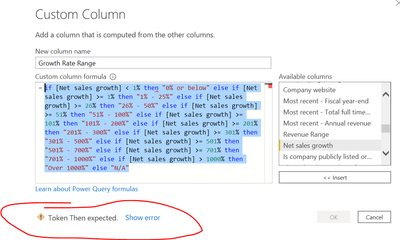
Hi- Can someone please help me what wrong I'm doing with the formula to get the error?
=if [Net sales growth] < 1% then "0% or below" else if [Net sales growth] >= 1% then "1% - 25%" else if [Net sales growth] >= 26% then "26% - 50%" else if [Net sales growth] >= 51% then "51% - 100%" else if [Net sales growth] >= 101% then "101% - 200%" else if [Net sales growth] >= 201% then "201% - 300%" else if [Net sales growth] >= 301% then "301% - 500%" else if [Net sales growth] >= 501% then "501% - 700%" else if [Net sales growth] >= 701% then "701% - 1000%" else if [Net sales growth] > 1000% then "Over 1000%" else "N/A"
Solved! Go to Solution.
Hi @sks2701
It must be the % character. You can't use it like that. Instead of 1% use the number: 1/100 or 0.01. Same for all other % instances in the code
Please mark the question solved when done and consider giving a thumbs up if posts are helpful.
Contact me privately for support with any larger-scale BI needs, tutoring, etc.
Cheers
Hi @sks2701
Make sure to replace all % values where you are representing a number e.g.
if [Net sales growth] < 0.01
else if [Net sales growth] >= 0.26
etc.
Phil
If I answered your question please mark my post as the solution.
If my answer helped solve your problem, give it a kudos by clicking on the Thumbs Up.
Proud to be a Super User!
Hi @sks2701
Make sure to replace all % values where you are representing a number e.g.
if [Net sales growth] < 0.01
else if [Net sales growth] >= 0.26
etc.
Phil
If I answered your question please mark my post as the solution.
If my answer helped solve your problem, give it a kudos by clicking on the Thumbs Up.
Proud to be a Super User!
THANK YOU! It helped 🙂
Hi @sks2701
It must be the % character. You can't use it like that. Instead of 1% use the number: 1/100 or 0.01. Same for all other % instances in the code
Please mark the question solved when done and consider giving a thumbs up if posts are helpful.
Contact me privately for support with any larger-scale BI needs, tutoring, etc.
Cheers
thank you !
Vote for your favorite vizzies from the Power BI World Championship submissions!
If you love stickers, then you will definitely want to check out our Community Sticker Challenge!
Check out the January 2026 Power BI update to learn about new features.
| User | Count |
|---|---|
| 16 | |
| 12 | |
| 9 | |
| 7 | |
| 6 |