cancel
Showing results for 
Search instead for 
Did you mean: 

Data Days is here! Join us now for 60+ days of learning, challenges, and connection. Learn more

Reply
sks2701
Helper III
Helper III

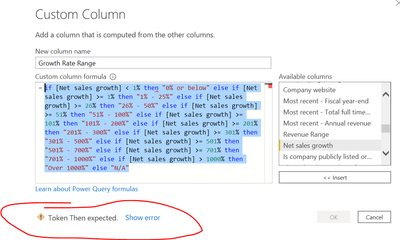
token then expected

Hi- Can someone please help me what wrong I'm doing with the formula to get the error?


=if [Net sales growth] < 1% then "0% or below" else if [Net sales growth] >= 1% then "1% - 25%" else if [Net sales growth] >= 26% then "26% - 50%" else if [Net sales growth] >= 51% then "51% - 100%" else if [Net sales growth] >= 101% then "101% - 200%" else if [Net sales growth] >= 201% then "201% - 300%" else if [Net sales growth] >= 301% then "301% - 500%" else if [Net sales growth] >= 501% then "501% - 700%" else if [Net sales growth] >= 701% then "701% - 1000%" else if [Net sales growth] > 1000% then "Over 1000%" else "N/A"


sks2701_0-1603832063079.png


2 ACCEPTED SOLUTIONS
AlB
Community Champion
Community Champion

Hi @sks2701 

It must be the % character. You can't use it like that. Instead of 1% use the number: 1/100 or  0.01. Same for all other % instances in the code

Please mark the question solved when done and consider giving a thumbs up if posts are helpful.

Contact me privately for support with any larger-scale BI needs, tutoring, etc.

Cheers 

SU18_powerbi_badge

View solution in original post

PhilipTreacy
Super User
Super User

Hi @sks2701 

Make sure to replace all % values where you are representing a number e.g.


if [Net sales growth] < 0.01
else if [Net sales growth] >= 0.26


 etc.

Phil


If I answered your question please mark my post as the solution.
If my answer helped solve your problem, give it a kudos by clicking on the Thumbs Up.


Did I answer your question? Then please mark my post as the solution.
If I helped you, click on the Thumbs Up to give Kudos.


Blog :: YouTube Channel :: Connect on Linkedin


Proud to be a Super User!


View solution in original post

4 REPLIES 4
PhilipTreacy
Super User
Super User

Hi @sks2701 

Make sure to replace all % values where you are representing a number e.g.


if [Net sales growth] < 0.01
else if [Net sales growth] >= 0.26


 etc.

Phil


If I answered your question please mark my post as the solution.
If my answer helped solve your problem, give it a kudos by clicking on the Thumbs Up.


Did I answer your question? Then please mark my post as the solution.
If I helped you, click on the Thumbs Up to give Kudos.


Blog :: YouTube Channel :: Connect on Linkedin


Proud to be a Super User!


THANK YOU! It helped 🙂

AlB
Community Champion
Community Champion

Hi @sks2701 

It must be the % character. You can't use it like that. Instead of 1% use the number: 1/100 or  0.01. Same for all other % instances in the code

Please mark the question solved when done and consider giving a thumbs up if posts are helpful.

Contact me privately for support with any larger-scale BI needs, tutoring, etc.

Cheers 

SU18_powerbi_badge

thank you !

Helpful resources

Announcements
Fabric Data Days is here Carousel

Fabric Data Days 2026

Don't miss out on Data Days, June 15 through August 7. Learn Fabric, Power BI, SQL, AI and more.

May Power BI Update Carousel

Power BI Monthly Update - May 2026

Check out the May 2026 Power BI update to learn about new features.

Power BI DataViz World Championships carousel

Power BI DataViz World Championships - June 2026

A new Power BI DataViz World Championship is coming this June! Don't miss out on submitting your entry.