This time we’re going bigger than ever. Fabric, Power BI, SQL, AI and more. We're covering it all. You won't want to miss it.
Learn moreDid you hear? There's a new SQL AI Developer certification (DP-800). Start preparing now and be one of the first to get certified. Register now
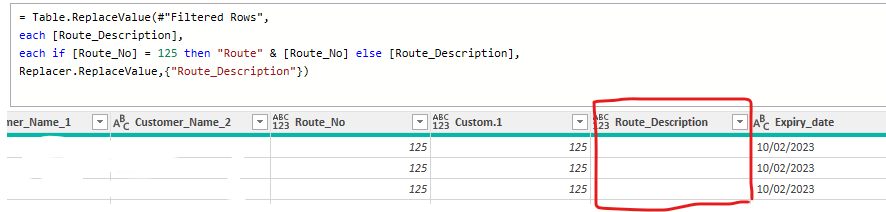
Could some one assit what I'm doing wrong, I'm trying to combine "Route" with [Route_No] and is reaming blamk whereas when I add [Epiry_date] is works perfectly.
Thanks in advance
Solved! Go to Solution.
You're missing the parenthesis
Table.ReplaceValue(#"Filtered Rows", each [Route_Description], each if [Route_No] = 125 then "Route" & Text.From([Route_No]) else [Route_Description], Replacer.ReplaceValue,{"Route_Description"})
I suggest a somewhat different approach, which also takes into account that the data type of Route_No, which is a string of digits, might be text or number (your column header shows it as type any.
If you will always be certain of the data type for Route_No, you can shorten the code a bit:
= Table.FromRecords(
Table.TransformRows(Source,
(r)=>
Record.TransformFields(r,
{"Route_Description", each
if Text.From(r[Route_No]) = "125" then "Route" & Text.From(r[Route_No]) else r[Route_Description]})
))
Hi @brinky
[Route_No] appears to be a numeral try Text.From( [Route_No] ) in your replace by statement instead.
Still nothing
= Table.ReplaceValue(#"Filtered Rows", each [Route_Description], each if [Route_No] = 125 then "Route" & Text.From[Route_No] else [Route_Description], Replacer.ReplaceValue,{"Route_Description"})
You're missing the parenthesis
Table.ReplaceValue(#"Filtered Rows", each [Route_Description], each if [Route_No] = 125 then "Route" & Text.From([Route_No]) else [Route_Description], Replacer.ReplaceValue,{"Route_Description"})
Check out the April 2026 Power BI update to learn about new features.
Sign up to receive a private message when registration opens and key events begin.
If you have recently started exploring Fabric, we'd love to hear how it's going. Your feedback can help with product improvements.