Join us at FabCon Atlanta from March 16 - 20, 2026, for the ultimate Fabric, Power BI, AI and SQL community-led event. Save $200 with code FABCOMM.
Register now!The Power BI Data Visualization World Championships is back! Get ahead of the game and start preparing now! Learn more
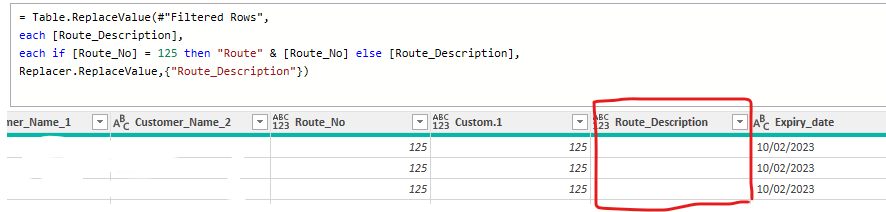
Could some one assit what I'm doing wrong, I'm trying to combine "Route" with [Route_No] and is reaming blamk whereas when I add [Epiry_date] is works perfectly.
Thanks in advance
Solved! Go to Solution.
You're missing the parenthesis
Table.ReplaceValue(#"Filtered Rows", each [Route_Description], each if [Route_No] = 125 then "Route" & Text.From([Route_No]) else [Route_Description], Replacer.ReplaceValue,{"Route_Description"})
I suggest a somewhat different approach, which also takes into account that the data type of Route_No, which is a string of digits, might be text or number (your column header shows it as type any.
If you will always be certain of the data type for Route_No, you can shorten the code a bit:
= Table.FromRecords(
Table.TransformRows(Source,
(r)=>
Record.TransformFields(r,
{"Route_Description", each
if Text.From(r[Route_No]) = "125" then "Route" & Text.From(r[Route_No]) else r[Route_Description]})
))
Hi @brinky
[Route_No] appears to be a numeral try Text.From( [Route_No] ) in your replace by statement instead.
Still nothing
= Table.ReplaceValue(#"Filtered Rows", each [Route_Description], each if [Route_No] = 125 then "Route" & Text.From[Route_No] else [Route_Description], Replacer.ReplaceValue,{"Route_Description"})
You're missing the parenthesis
Table.ReplaceValue(#"Filtered Rows", each [Route_Description], each if [Route_No] = 125 then "Route" & Text.From([Route_No]) else [Route_Description], Replacer.ReplaceValue,{"Route_Description"})
Check out the November 2025 Power BI update to learn about new features.
Advance your Data & AI career with 50 days of live learning, contests, hands-on challenges, study groups & certifications and more!
| User | Count |
|---|---|
| 11 | |
| 7 | |
| 5 | |
| 5 | |
| 3 |