Get certified for free when you join Fabric Data Days 2026 and dive into Fabric, Power BI, SQL, AI, and other essential data skills.
Join nowJuly 28 - August 9 | Final Round of the Power BI Dataviz World Championships. This is your chance. Learn more
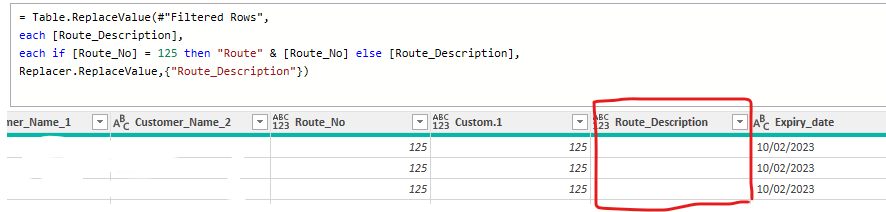
Could some one assit what I'm doing wrong, I'm trying to combine "Route" with [Route_No] and is reaming blamk whereas when I add [Epiry_date] is works perfectly.
Thanks in advance
Solved! Go to Solution.
You're missing the parenthesis
Table.ReplaceValue(#"Filtered Rows", each [Route_Description], each if [Route_No] = 125 then "Route" & Text.From([Route_No]) else [Route_Description], Replacer.ReplaceValue,{"Route_Description"})
I suggest a somewhat different approach, which also takes into account that the data type of Route_No, which is a string of digits, might be text or number (your column header shows it as type any.
If you will always be certain of the data type for Route_No, you can shorten the code a bit:
= Table.FromRecords(
Table.TransformRows(Source,
(r)=>
Record.TransformFields(r,
{"Route_Description", each
if Text.From(r[Route_No]) = "125" then "Route" & Text.From(r[Route_No]) else r[Route_Description]})
))
Hi @brinky
[Route_No] appears to be a numeral try Text.From( [Route_No] ) in your replace by statement instead.
Still nothing
= Table.ReplaceValue(#"Filtered Rows", each [Route_Description], each if [Route_No] = 125 then "Route" & Text.From[Route_No] else [Route_Description], Replacer.ReplaceValue,{"Route_Description"})
You're missing the parenthesis
Table.ReplaceValue(#"Filtered Rows", each [Route_Description], each if [Route_No] = 125 then "Route" & Text.From([Route_No]) else [Route_Description], Replacer.ReplaceValue,{"Route_Description"})
Join us in Barcelona for FabCon and SQLCon, the Fabric, Power BI, SQL, and AI community event. Save €200 with code FABCMTY200.
If you love stickers, then you will definitely want to check out our community sticker challenge, Barcelona edition!
Check out the July 2026 Power BI update to learn about new features.