cancel
Showing results for 
Search instead for 
Did you mean: 

The Power BI Data Visualization World Championships is back! Get ahead of the game and start preparing now! Learn more

Reply
ukozlows
Regular Visitor

Turning a JSON API into data with Get Data and Power Query

Hello,


I generated a API from a website hosting data and used it to create my power query source code which is a follows:


= Json.Document(Web.Contents("https://ec.europa.eu/eurostat/api/dissemination/statistics/1.0/data/prc_hicp_midx?format=JSON&freq=M..."))


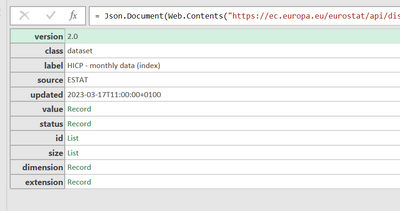
At that point, the following is displayed.  I have been searching to no avail to learn how to turn this into the data.  How do I get at the data?


ukozlows_0-1679499729539.png


1 ACCEPTED SOLUTION

So, I have spent more time then I would have liked to understand the JSON response that you have and your issues.  Which is kinda of a good thing to learn something new.  So here is the breakdown...

  1. The JSON response is return is in a JSON-stat format which is a main statistical standard.
  2. You can spend a lot of time breaking down the response and building the table in Power BI
  3. I found a go to source which was very helpful at https://json-stat.org/
  4. Here are the instructions for how you can get the JSON in a format to be used...https://eriksvensen.wordpress.com/2019/01/09/guide-how-to-import-data-from-eurostat-directly-into-po...


YOur code to use is prc_hicp_midx

The tool URL is Tool - Query Builder - Eurostat (europa.eu)

View solution in original post

6 REPLIES 6
ukozlows
Regular Visitor

I saw that the source code in Power Query was truncated so let me give the complete code incase someone would please use it to create the solution.  


=Json.Document(Web.Contents("https://ec.europa.eu/eurostat/api/dissemination/statistics/1.0/data/prc_hicp_midx?format=JSON&freq=M..."))


Incase it truncates it again when i repost this, here is the code in sections.


= Json.Document(Web.Contents(

"https:

//ec.europa.eu/eurostat/api/dissemination/statistics/1.0/data/prc_hicp_midx?format=JSON&freq=M&unit=I15&coicop=CP00"))

What should the data look like from the response?  That is to say, how is it structured in the source?  Can you provide a sample or screenshot?

ukozlows_0-1679502592526.png


Are you able to change the API?    The API is creating objects, but it is not well structured.

So, I have spent more time then I would have liked to understand the JSON response that you have and your issues.  Which is kinda of a good thing to learn something new.  So here is the breakdown...

  1. The JSON response is return is in a JSON-stat format which is a main statistical standard.
  2. You can spend a lot of time breaking down the response and building the table in Power BI
  3. I found a go to source which was very helpful at https://json-stat.org/
  4. Here are the instructions for how you can get the JSON in a format to be used...https://eriksvensen.wordpress.com/2019/01/09/guide-how-to-import-data-from-eurostat-directly-into-po...


YOur code to use is prc_hicp_midx

The tool URL is Tool - Query Builder - Eurostat (europa.eu)

Helpful resources

Announcements
Power BI DataViz World Championships

Power BI Dataviz World Championships

The Power BI Data Visualization World Championships is back! Get ahead of the game and start preparing now!

December 2025 Power BI Update Carousel

Power BI Monthly Update - December 2025

Check out the December 2025 Power BI Holiday Recap!

FabCon Atlanta 2026 carousel

FabCon Atlanta 2026

Join us at FabCon Atlanta, March 16-20, for the ultimate Fabric, Power BI, AI and SQL community-led event. Save $200 with code FABCOMM.