Share feedback directly with Fabric product managers, participate in targeted research studies and influence the Fabric roadmap.
Sign up nowGet Fabric certified for FREE! Don't miss your chance! Learn more
Hi Experts
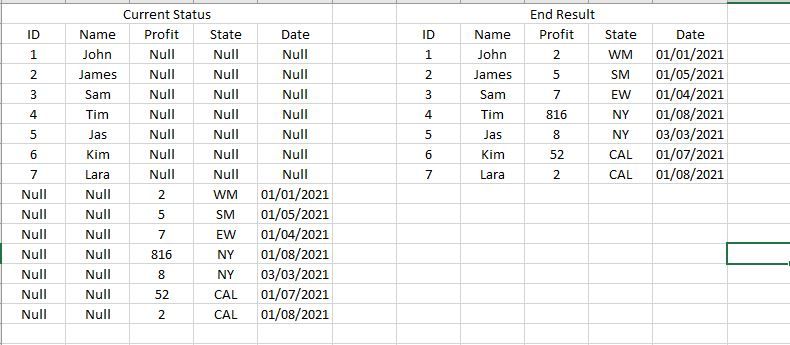
How would you do the following in Power Query in Power BI. See start and end results in the Image below....
In a nutshall i need to shift the cell up in the last 3 columns and replace the null values with the real data which is sitting at the botttom..
Solved! Go to Solution.
@Anonymous
Make sure you choose Righter out when merging with duplicated table.
Please the the solution in the pbix, you can follow the applied steps with your actual model.
Best regards
Paul Zheng _ Community Support Team
If this post helps, please Accept it as the solution to help the other members find it more quickly.
@Anonymous
Make sure you choose Righter out when merging with duplicated table.
Please the the solution in the pbix, you can follow the applied steps with your actual model.
Best regards
Paul Zheng _ Community Support Team
If this post helps, please Accept it as the solution to help the other members find it more quickly.
Hello @Anonymous ,
what is the data source used in this? Is the source data in this format? If it is and it is somehow correct order.
This ishow you solve it
You duplicate query. Filter only blanks from column. Create an index column and merge it back to table original table.
If this solved the issue please accept it as solution 🙂
If you love stickers, then you will definitely want to check out our Community Sticker Challenge!
Check out the January 2026 Power BI update to learn about new features.
| User | Count |
|---|---|
| 13 | |
| 11 | |
| 11 | |
| 8 | |
| 6 |