This time we’re going bigger than ever. Fabric, Power BI, SQL, AI and more. We're covering it all. You won't want to miss it.
Learn moreJoin the FabCon + SQLCon recap series. Up next: Power BI, Real-Time Intelligence, IQ and AI, and Data Factory take center stage. All sessions are available on-demand after the live show. Register now
Hi All
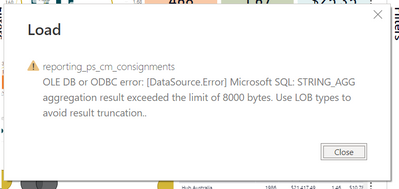
One of my report suddenly started throughing the below error and is not allowing the report to refresh.
its a simple Azure connect to a view,
i have tried to make all the the changes in the power Bi interface but i have feeling it got to do with the SQL code used to generate the view .
The key question i have is i use the same connection to access this view in other reports but this error is not occuring there.
would be great if some one who has faces something similar can help me our or point out if i am missing out on someting obvious.
Hi @amaan91 ,
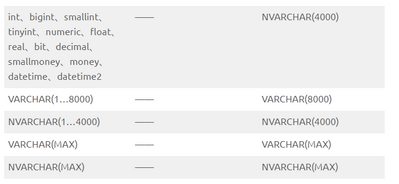
Based on the error message, seems like you can try to change the data type from the data source to avoid it.
Refer:
Best Regards,
Community Support Team _ Yingjie Li
If this post helps, then please consider Accept it as the solution to help the other members find it more quickly.
Hi @Anonymous ,
Based on the error message, seems like you can try to change the data type from the data source to avoid it.
Refer:
Best Regards,
Community Support Team _ Yingjie Li
If this post helps, then please consider Accept it as the solution to help the other members find it more quickly.
Check out the April 2026 Power BI update to learn about new features.
If you have recently started exploring Fabric, we'd love to hear how it's going. Your feedback can help with product improvements.
A new Power BI DataViz World Championship is coming this June! Don't miss out on submitting your entry.
| User | Count |
|---|---|
| 3 | |
| 3 | |
| 3 | |
| 2 | |
| 2 |
| User | Count |
|---|---|
| 5 | |
| 4 | |
| 4 | |
| 4 | |
| 4 |