Join us at FabCon Atlanta from March 16 - 20, 2026, for the ultimate Fabric, Power BI, AI and SQL community-led event. Save $200 with code FABCOMM.
Register now!The Power BI Data Visualization World Championships is back! Get ahead of the game and start preparing now! Learn more
Hi Experts
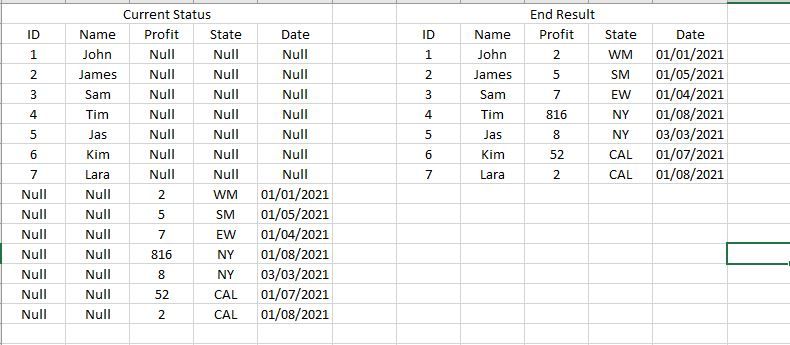
How would you do the following in Power Query in Power BI. See start and end results in the Image below....
In a nutshall i need to shift the cell up in the last 3 columns and replace the null values with the real data which is sitting at the botttom..
Solved! Go to Solution.
@Anonymous
Make sure you choose Righter out when merging with duplicated table.
Please the the solution in the pbix, you can follow the applied steps with your actual model.
Best regards
Paul Zheng _ Community Support Team
If this post helps, please Accept it as the solution to help the other members find it more quickly.
@Anonymous
Make sure you choose Righter out when merging with duplicated table.
Please the the solution in the pbix, you can follow the applied steps with your actual model.
Best regards
Paul Zheng _ Community Support Team
If this post helps, please Accept it as the solution to help the other members find it more quickly.
Hello @Anonymous ,
what is the data source used in this? Is the source data in this format? If it is and it is somehow correct order.
This ishow you solve it
You duplicate query. Filter only blanks from column. Create an index column and merge it back to table original table.
If this solved the issue please accept it as solution 🙂
The Power BI Data Visualization World Championships is back! Get ahead of the game and start preparing now!