We've captured the moments from FabCon & SQLCon that everyone is talking about, and we are bringing them to the community, live and on-demand. Starts on April 14th. Register now
Hi there,
I want to connect a Sharepoint folder to powerBI and then filter the files in it by the most recent file. In PowerQuery some dates in the creation date colum get errors. I found a workaround for this porblem in changing the API to 14 This works for the date error, but it creates a new error.
When I work with API 14 Powerquery allways creates a bottom line with errors in every column. It contains the following error:
DataSource.Error: SharePoint: Request failed: The remote server returned an error: (500) Internal Server Error. (An error occurred while processing this request.)
I was not able to find a solution to this error.
Thanks in advance for your help.
Noah
Solved! Go to Solution.
@Anonymous
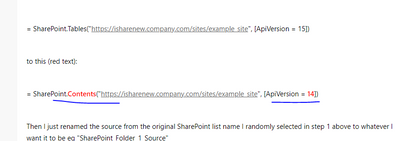
Try also change the SharePoint connector like below:
Solved: Connecting to SharePoint Folder error - Microsoft Power BI Community
Paul Zheng _ Community Support Team
If this post helps, please Accept it as the solution to help the other members find it more quickly.
@Anonymous
Try also change the SharePoint connector like below:
Solved: Connecting to SharePoint Folder error - Microsoft Power BI Community
Paul Zheng _ Community Support Team
If this post helps, please Accept it as the solution to help the other members find it more quickly.
If you have recently started exploring Fabric, we'd love to hear how it's going. Your feedback can help with product improvements.
A new Power BI DataViz World Championship is coming this June! Don't miss out on submitting your entry.
Share feedback directly with Fabric product managers, participate in targeted research studies and influence the Fabric roadmap.
| User | Count |
|---|---|
| 5 | |
| 3 | |
| 3 | |
| 2 | |
| 2 |
| User | Count |
|---|---|
| 10 | |
| 8 | |
| 7 | |
| 7 | |
| 5 |