Get certified for free when you join Fabric Data Days 2026 and dive into Fabric, Power BI, SQL, AI, and other essential data skills.
Join nowJuly 7 - July 17 | Round 2 of the Power BI Dataviz World Championships. Don't miss your chance! Learn more
Hi there,
I want to connect a Sharepoint folder to powerBI and then filter the files in it by the most recent file. In PowerQuery some dates in the creation date colum get errors. I found a workaround for this porblem in changing the API to 14 This works for the date error, but it creates a new error.
When I work with API 14 Powerquery allways creates a bottom line with errors in every column. It contains the following error:
DataSource.Error: SharePoint: Request failed: The remote server returned an error: (500) Internal Server Error. (An error occurred while processing this request.)
I was not able to find a solution to this error.
Thanks in advance for your help.
Noah
Solved! Go to Solution.
@Anonymous
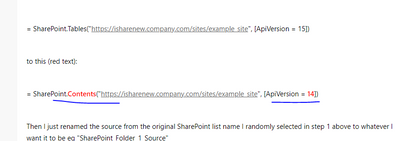
Try also change the SharePoint connector like below:
Solved: Connecting to SharePoint Folder error - Microsoft Power BI Community
Paul Zheng _ Community Support Team
If this post helps, please Accept it as the solution to help the other members find it more quickly.
@Anonymous
Try also change the SharePoint connector like below:
Solved: Connecting to SharePoint Folder error - Microsoft Power BI Community
Paul Zheng _ Community Support Team
If this post helps, please Accept it as the solution to help the other members find it more quickly.
Join us in Barcelona for FabCon and SQLCon, the Fabric, Power BI, SQL, and AI community event. Save €200 with code FABCMTY200.
Join Fabric Data Days 2026: 60 days of free live/on-demand sessions, challenges, study groups, and certification opportunities.
| User | Count |
|---|---|
| 8 | |
| 6 | |
| 5 | |
| 4 | |
| 4 |