cancel
Showing results for 
Search instead for 
Did you mean: 

July 7 - July 17 | Round 2 of the Power BI Dataviz World Championships. Don't miss your chance! Learn more

Reply
emredici
Regular Visitor

Replicate SUMIF in Power Query

Hi all,


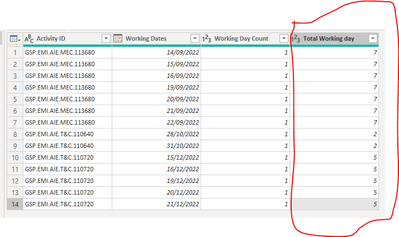
I have the below table in Power BI Power query.

I wanted to simplify the subject and paste the Excel copy of it instead.


The columns with blue titles are my available data. I want to generate the Green column in Power query.

emredici_2-1656945021631.png

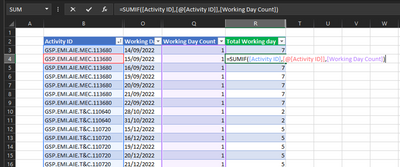
It's so simple in excel. As shown below. 

emredici_3-1656945085508.png

How can I do the same operation in Power BI? I would like to return each sumif figure on each row.


Ultimately, my goal is to add a new column and generate a calculated copy of the highligted column in PBI power query.

emredici_4-1656945378582.png

Thank you.


2 ACCEPTED SOLUTIONS
ronrsnfld
Super User
Super User

  • Group by Activity ID
  • Aggregate by
    • All Rows
    • Sum of Working Day Count
  • Expand the "All Rows" aggregation


View solution in original post

It does not appear that you are in the Query Editor (Power Query).

Select `Home=>Transform`

Then you will find the GroupBy option and, when the dialog box opens, select Advanced to be able to add multiple aggregations/operations

View solution in original post

4 REPLIES 4
emredici
Regular Visitor

Hi @ronrsnfld,

Thanks for the response.

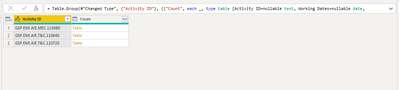
I grouped the data by the Activity ID.

emredici_1-1656959067506.png

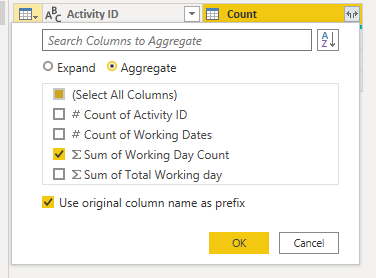
I aggregated all with sum of working day count. However, I couldn't see anything regarding "all rows"

emredici_2-1656959148581.png

The end result is this. I can't aggregate or select All Rows.

emredici_4-1656959312028.png


It does not appear that you are in the Query Editor (Power Query).

Select `Home=>Transform`

Then you will find the GroupBy option and, when the dialog box opens, select Advanced to be able to add multiple aggregations/operations

Thank you! It is resolved. You were extremely fast 😄
This forum is lucky to have someone like you.

ronrsnfld
Super User
Super User

  • Group by Activity ID
  • Aggregate by
    • All Rows
    • Sum of Working Day Count
  • Expand the "All Rows" aggregation


Helpful resources

Announcements
FabCon and SQLCon Barcelona 2026

FabCon & SQLCon – Barcelona 2026

Join us in Barcelona for FabCon and SQLCon, the Fabric, Power BI, SQL, and AI community event. Save €200 with code FABCMTY200.

60 days of Data Days Carousel

Data Days 2026

Join Fabric Data Days 2026: 60 days of free live/on-demand sessions, challenges, study groups, and certification opportunities.

Power BI DataViz World Championships carousel

Power BI DataViz World Championships - June 2026

A new Power BI DataViz World Championship is coming this June! Don't miss out on submitting your entry.